Getting Started with Petroleum Office
Petroleum Office is an Excel add-in for petroleum engineers. It adds 600+ engineering functions, a catalog of Excel LAMBDAs, reusable worksheet templates (blueprints), and productivity tools directly into Excel.
Installation
- Download the installer (
.msifile) from petroleumoffice.com - Run the installer and follow the prompts
- Open Excel — the Petroleum Office tab appears in the ribbon
The Ribbon
After installation, a new Petroleum Office tab appears in the Excel ribbon. It has three groups: Library, Tools, and Settings.
Every button in the Library and Tools groups opens a task pane docked at the side of the Excel window, rather than a modal dialog. Panes stay open while you work in the sheet, and related tools share one pane as tabs.
Library
The three catalog browsers. They share a single Library pane — clicking any of these buttons opens that pane and brings the matching tab to the front.
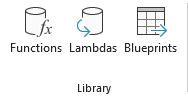
| Button | Opens | What it is for |
|---|---|---|
| Functions | Function Browser | Search and browse the whole function catalog, organised as a tree, and insert a function into the active cell |
| Lambdas | Lambda Manager | Browse the catalog of Excel LAMBDA formulas and add them to your workbook |
| Blueprints | Blueprint Manager | Browse and insert reusable worksheet templates |
Tools
The productivity tools. These share a single Tools pane, in this order:
| Button | What it does |
|---|---|
| Unit Converter | Convert between 1,500+ engineering units without writing a formula |
| Case Generator | Batch-create simulation input files from an Excel template |
| Simulation Results Import | Read ECLIPSE and CMG simulator result vectors into worksheets |
| LAS Import | Read LAS well-log files into a worksheet |
Settings
Sign in with your account and check your licence status. The Settings button opens a dialog whose Add-in panel compares your installed version against the latest release.
Your First Function
Let's try a simple PVT calculation. All Petroleum Office functions start with PO. followed by the category and property name.
Example: Convert API gravity to oil specific gravity
In any cell, type:
=PO.PVT.SG.Oil.FromAPI(35)
This converts an API gravity of 35 to oil specific gravity. Press Enter and see the result.
Example: Calculate bubble point pressure
=PO.PVT.Pb.ByStanding(0.65, 35, 500, 200)
Parameters: gas specific gravity (0.65), API gravity (35), solution GOR in scf/STB (500), and temperature in degF (200). Returns bubble point pressure in psi using Standing's correlation.
Using IntelliSense
As you type a function name, Excel shows IntelliSense tooltips with parameter descriptions. This works automatically — just start typing =PO. and browse the available functions.
Next Steps
- Licensing and Your Account — signing in, and what each licence status means
- Using the Function Browser — find a function when you don't know its name
- Function Naming Conventions — learn how to read function names like
PO.PVT.Pb.ByStanding - Using Blueprints — browse and insert reusable worksheet templates
- Using Lambdas — SI-unit versions of the functions, added to your workbook
- Using Array Functions — work with functions that return multiple values
- Unit Conversion — convert between 1,500+ engineering units
You can also browse the same catalogs on this site before you open Excel: functions, lambdas, and blueprints.