Surface Gathering Diagram — Generated from a Network Table, with Live Labels
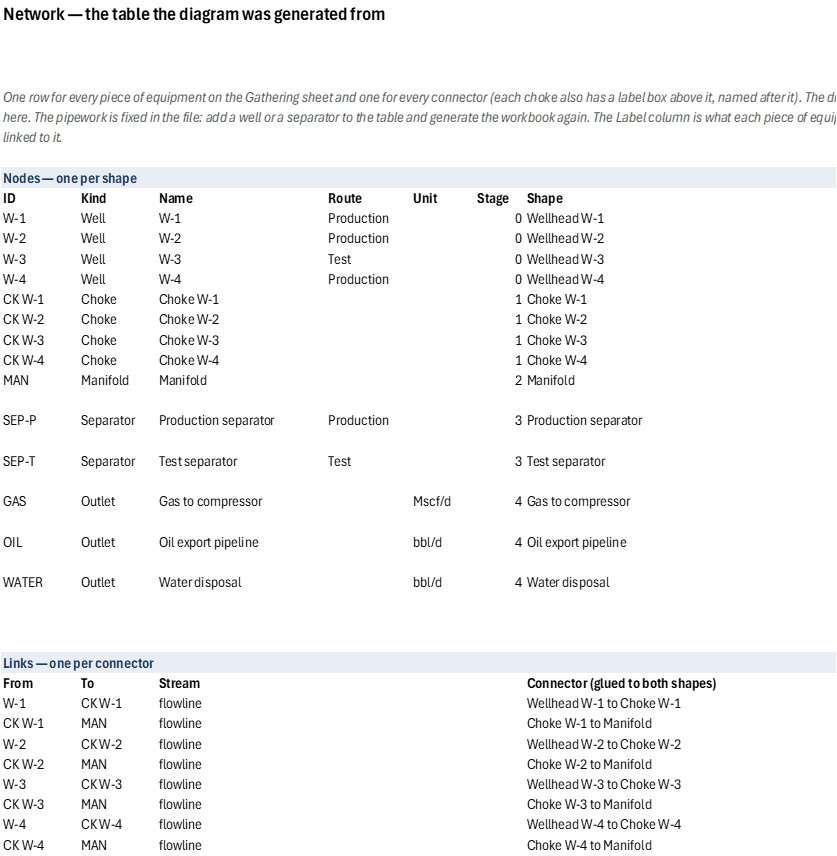
A diagram of a surface gathering system, drawn from a table. Wells with wellhead pictures, chokes, a manifold, production and test separators and the outlets they feed (gas to the compressor, oil export, water disposal) are joined by flowline connectors glued to the shapes, so dragging a shape in Excel keeps its lines attached. The Network sheet is the table the drawing was generated from — a row for every piece of equipment and every connector — so the diagram cannot show a link the table does not hold.
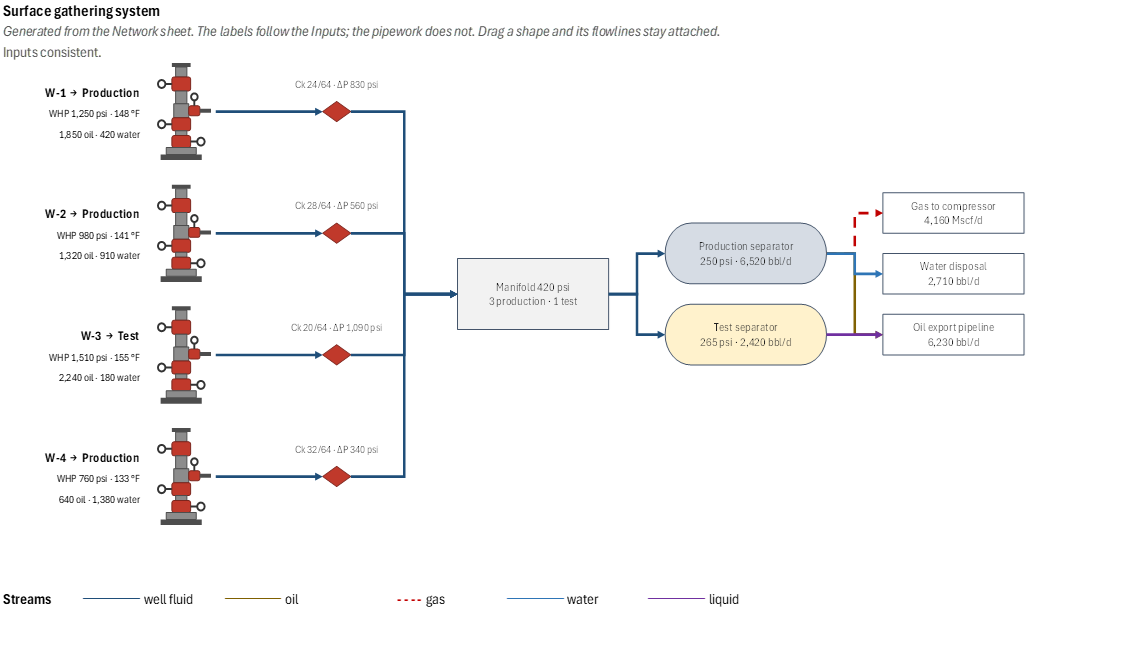
The numbers stay live. The text in the manifold, the separators, the outlets and above each choke is linked to a cell that calculates from the Inputs (wellhead pressure and temperature, oil, water and gas rates, choke size and the route each well is lined up to, and the manifold and separator pressures); the details of each well are cells beside its wellhead. Route a well to the other separator and the separators' and outlets' rates move with it. Every formula is plain Excel, so the workbook needs no add-in.
The pipework is fixed in the file. A column per stage — wells, chokes, manifold, separators, outlets — and each shape at the mean height of what feeds it lay the diagram out from the table, so a well, its choke and the next shape stay on one straight line wherever they can. Add a well or a separator to the table and generate the workbook again: the layout finds it a place. A workbook cannot redraw itself, so changing the table in the file does not move a flowline.
Input checks flag a set of inputs that cannot be a gathering system — a well routed to a separator that does not exist, a wellhead pressure below the manifold, a manifold below a separator — in red with the fix spelled out. The workbook does not calculate the network: the choke's pressure drop is the wellhead pressure less the manifold pressure and the rates are those entered.
Inputs
Named ranges you can edit — the labels recalculate from them. The wells, separators and routes come from the Network table and are not inputs.
| Name | Description | Default | Unit |
|---|---|---|---|
GS_WHP, GS_WHT |
Wellhead pressure and temperature, per well | 1250/980/1510/760, 148/141/155/133 | psi, °F |
GS_Oil, GS_Water, GS_Gas |
Oil and water rates and gas rate, per well | W-1: 1850, 420, 2100 | bbl/d, Mscf/d |
GS_Choke |
Choke size, per well | 24, 28, 20, 32 | 1/64 in |
GS_Route |
Separator a well is lined up to: Production or Test | W-3 on Test, the others Production | — |
GS_Pman |
Manifold pressure | 420 | psi |
GS_SepP |
Separator pressure, per separator | 250 (production), 265 (test) | psi |
4 sheets, shown with the values the file opens with
| A | |
|---|---|
| 1 | Surface gathering diagram — drawn from a network table, with live labels |
| 2 | |
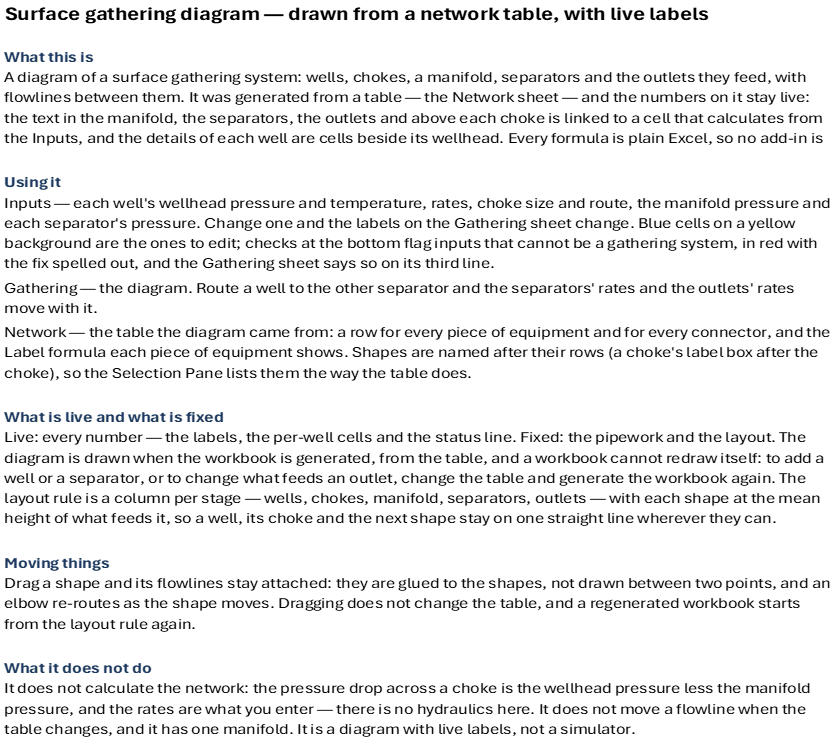
| 3 | What this is |
| 4 | A diagram of a surface gathering system: wells, chokes, a manifold, separators and the outlets they feed, with flowlines between them. It was generated from a table — the Network sheet — and the numbers on it stay live: the text in the manifold, the separators, the outlets and above each choke is linked to a cell that calculates from the Inputs, and the details of each well are cells beside its wellhead. Every formula is plain Excel, so no add-in is needed. |
| 5 | |
| 6 | Using it |
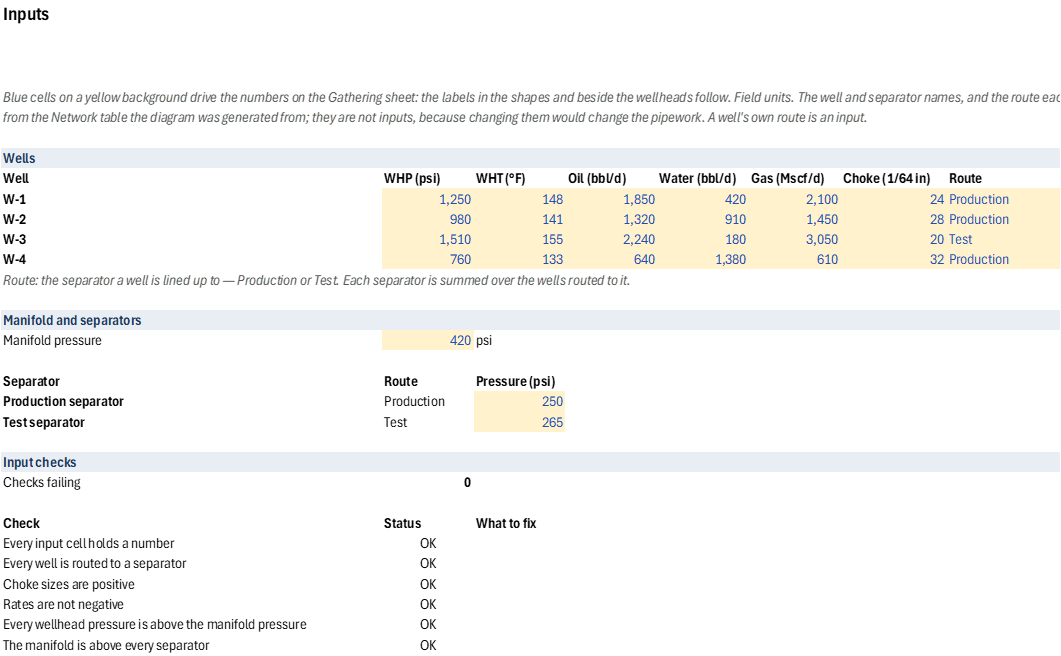
| 7 | Inputs — each well's wellhead pressure and temperature, rates, choke size and route, the manifold pressure and each separator's pressure. Change one and the labels on the Gathering sheet change. Blue cells on a yellow background are the ones to edit; checks at the bottom flag inputs that cannot be a gathering system, in red with the fix spelled out, and the Gathering sheet says so on its third line. |
| 8 | Gathering — the diagram. Route a well to the other separator and the separators' rates and the outlets' rates move with it. |
| 9 | Network — the table the diagram came from: a row for every piece of equipment and for every connector, and the Label formula each piece of equipment shows. Shapes are named after their rows (a choke's label box after the choke), so the Selection Pane lists them the way the table does. |
| 10 | |
| 11 | What is live and what is fixed |
| 12 | Live: every number — the labels, the per-well cells and the status line. Fixed: the pipework and the layout. The diagram is drawn when the workbook is generated, from the table, and a workbook cannot redraw itself: to add a well or a separator, or to change what feeds an outlet, change the table and generate the workbook again. The layout rule is a column per stage — wells, chokes, manifold, separators, outlets — with each shape at the mean height of what feeds it, so a well, its choke and the next shape stay on one straight line wherever they can. |
| 13 | |
| 14 | Moving things |
| 15 | Drag a shape and its flowlines stay attached: they are glued to the shapes, not drawn between two points, and an elbow re-routes as the shape moves. Dragging does not change the table, and a regenerated workbook starts from the layout rule again. |
| 16 | |
| 17 | What it does not do |
| 18 | It does not calculate the network: the pressure drop across a choke is the wellhead pressure less the manifold pressure, and the rates are what you enter — there is no hydraulics here. It does not move a flowline when the table changes, and it has one manifold. It is a diagram with live labels, not a simulator. |
| A | B | C | D | E | F | G | H | I | |
|---|---|---|---|---|---|---|---|---|---|
| 1 | Inputs | ||||||||
| 2 | Blue cells on a yellow background drive the numbers on the Gathering sheet: the labels in the shapes and beside the wellheads follow. Field units. The well and separator names, and the route each separator serves, come from the Network table the diagram was generated from; they are not inputs, because changing them would change the pipework. A well's own route is an input. | ||||||||
| 3 | |||||||||
| 4 | Wells | ||||||||
| 5 | Well | WHP (psi) | WHT (°F) | Oil (bbl/d) | Water (bbl/d) | Gas (Mscf/d) | Choke (1/64 in) | Route | |
| 6 | W-1 | 1,250 | 148 | 1,850 | 420 | 2,100 | 24 | Production | |
| 7 | W-2 | 980 | 141 | 1,320 | 910 | 1,450 | 28 | Production | |
| 8 | W-3 | 1,510 | 155 | 2,240 | 180 | 3,050 | 20 | Test | |
| 9 | W-4 | 760 | 133 | 640 | 1,380 | 610 | 32 | Production | |
| 10 | Route: the separator a well is lined up to — Production or Test. Each separator is summed over the wells routed to it. | ||||||||
| 11 | |||||||||
| 12 | Manifold and separators | ||||||||
| 13 | Manifold pressure | 420 | psi | ||||||
| 14 | |||||||||
| 15 | Separator | Route | Pressure (psi) | ||||||
| 16 | Production separator | Production | 250 | ||||||
| 17 | Test separator | Test | 265 | ||||||
| 18 | |||||||||
| 19 | Input checks | ||||||||
| 20 | Checks failing | 0 | |||||||
| 21 | |||||||||
| 22 | Check | Status | What to fix | ||||||
| 23 | Every input cell holds a number | OK | |||||||
| 24 | Every well is routed to a separator | OK | |||||||
| 25 | Choke sizes are positive | OK | |||||||
| 26 | Rates are not negative | OK | |||||||
| 27 | Every wellhead pressure is above the manifold pressure | OK | |||||||
| 28 | The manifold is above every separator | OK |
| A | B | C | D | E | F | G | H | I | J | K | |
|---|---|---|---|---|---|---|---|---|---|---|---|
| 1 | Surface gathering system | ||||||||||
| 2 | Generated from the Network sheet. The labels follow the Inputs; the pipework does not. Drag a shape and its flowlines stay attached. | ||||||||||
| 3 | Inputs consistent. | ||||||||||
| 4 | |||||||||||
| 5 | W-1 → Production | ||||||||||
| 6 | WHP 1,250 psi · 148 °F | ||||||||||
| 7 | 1,850 oil · 420 water | ||||||||||
| 8 | |||||||||||
| 9 | |||||||||||
| 10 | |||||||||||
| 11 | W-2 → Production | ||||||||||
| 12 | WHP 980 psi · 141 °F | ||||||||||
| 13 | 1,320 oil · 910 water | ||||||||||
| 14 | |||||||||||
| 15 | |||||||||||
| 16 | |||||||||||
| 17 | W-3 → Test | ||||||||||
| 18 | WHP 1,510 psi · 155 °F | ||||||||||
| 19 | 2,240 oil · 180 water | ||||||||||
| 20 | |||||||||||
| 21 | |||||||||||
| 22 | |||||||||||
| 23 | W-4 → Production | ||||||||||
| 24 | WHP 760 psi · 133 °F | ||||||||||
| 25 | 640 oil · 1,380 water | ||||||||||
| 26 | |||||||||||
| 27 | |||||||||||
| 28 | |||||||||||
| 29 | |||||||||||
| 30 | Streams | ━━━━ | well fluid | ━━━━ | oil | - - - - | gas | ━━━━ | water | ━━━━ | liquid |
| A | B | C | D | E | F | G | H | |
|---|---|---|---|---|---|---|---|---|
| 1 | Network — the table the diagram was generated from | |||||||
| 2 | One row for every piece of equipment on the Gathering sheet and one for every connector (each choke also has a label box above it, named after it). The drawing was made from this table, so it cannot show a link that is not here. The pipework is fixed in the file: add a well or a separator to the table and generate the workbook again. The Label column is what each piece of equipment shows — a formula on the Inputs — and the shape's text is linked to it. | |||||||
| 3 | ||||||||
| 4 | Nodes — one per shape | |||||||
| 5 | ID | Kind | Name | Route | Unit | Stage | Shape | Label (the text the shape shows — live) |
| 6 | W-1 | Well | W-1 | Production | 0 | Wellhead W-1 | In cells beside the wellhead on the Gathering sheet. | |
| 7 | W-2 | Well | W-2 | Production | 0 | Wellhead W-2 | In cells beside the wellhead on the Gathering sheet. | |
| 8 | W-3 | Well | W-3 | Test | 0 | Wellhead W-3 | In cells beside the wellhead on the Gathering sheet. | |
| 9 | W-4 | Well | W-4 | Production | 0 | Wellhead W-4 | In cells beside the wellhead on the Gathering sheet. | |
| 10 | CK W-1 | Choke | Choke W-1 | 1 | Choke W-1 | Ck 24/64 · ΔP 830 psi | ||
| 11 | CK W-2 | Choke | Choke W-2 | 1 | Choke W-2 | Ck 28/64 · ΔP 560 psi | ||
| 12 | CK W-3 | Choke | Choke W-3 | 1 | Choke W-3 | Ck 20/64 · ΔP 1,090 psi | ||
| 13 | CK W-4 | Choke | Choke W-4 | 1 | Choke W-4 | Ck 32/64 · ΔP 340 psi | ||
| 14 | MAN | Manifold | Manifold | 2 | Manifold | Manifold 420 psi 3 production · 1 test | ||
| 15 | SEP-P | Separator | Production separator | Production | 3 | Production separator | Production separator 250 psi · 6,520 bbl/d | |
| 16 | SEP-T | Separator | Test separator | Test | 3 | Test separator | Test separator 265 psi · 2,420 bbl/d | |
| 17 | GAS | Outlet | Gas to compressor | Mscf/d | 4 | Gas to compressor | Gas to compressor 4,160 Mscf/d | |
| 18 | OIL | Outlet | Oil export pipeline | bbl/d | 4 | Oil export pipeline | Oil export pipeline 6,230 bbl/d | |
| 19 | WATER | Outlet | Water disposal | bbl/d | 4 | Water disposal | Water disposal 2,710 bbl/d | |
| 20 | ||||||||
| 21 | ||||||||
| 22 | Links — one per connector | |||||||
| 23 | From | To | Stream | Connector (glued to both shapes) | ||||
| 24 | W-1 | CK W-1 | flowline | Wellhead W-1 to Choke W-1 | ||||
| 25 | CK W-1 | MAN | flowline | Choke W-1 to Manifold | ||||
| 26 | W-2 | CK W-2 | flowline | Wellhead W-2 to Choke W-2 | ||||
| 27 | CK W-2 | MAN | flowline | Choke W-2 to Manifold | ||||
| 28 | W-3 | CK W-3 | flowline | Wellhead W-3 to Choke W-3 | ||||
| 29 | CK W-3 | MAN | flowline | Choke W-3 to Manifold | ||||
| 30 | W-4 | CK W-4 | flowline | Wellhead W-4 to Choke W-4 | ||||
| 31 | CK W-4 | MAN | flowline | Choke W-4 to Manifold | ||||
| 32 | MAN | SEP-P | flowline | Manifold to Production separator | ||||
| 33 | MAN | SEP-T | flowline | Manifold to Test separator | ||||
| 34 | SEP-P | GAS | gas | Production separator to Gas to compressor | ||||
| 35 | SEP-P | OIL | oil | Production separator to Oil export pipeline | ||||
| 36 | SEP-P | WATER | water | Production separator to Water disposal | ||||
| 37 | SEP-T | OIL | liquid | Test separator to Oil export pipeline |
| Name | Refers To | Comment |
|---|---|---|
| GS_Choke | Inputs!$G$6:$G$9 | |
| GS_Gas | Inputs!$F$6:$F$9 | |
| GS_Oil | Inputs!$D$6:$D$9 | |
| GS_Pman | Inputs!$B$13 | |
| GS_Problems | Inputs!$B$20 | |
| GS_Route | Inputs!$H$6:$H$9 | |
| GS_SepName | Inputs!$A$16:$A$17 | |
| GS_SepP | Inputs!$C$16:$C$17 | |
| GS_SepRoute | Inputs!$B$16:$B$17 | |
| GS_WHP | Inputs!$B$6:$B$9 | |
| GS_WHT | Inputs!$C$6:$C$9 | |
| GS_Water | Inputs!$E$6:$E$9 | |
| GS_Well | Inputs!$A$6:$A$9 |
| Opens in | Works in any Excel: formulas and named LAMBDAs only, no add-in needed. |
| File | GatheringDiagram.xlsx, 17 KB |
| Category | Production |
| For agents and tools | Structure (.json) · Descriptor (.md) |