Well-Program Economics — Scenario Table, NPV, IRR, Payout
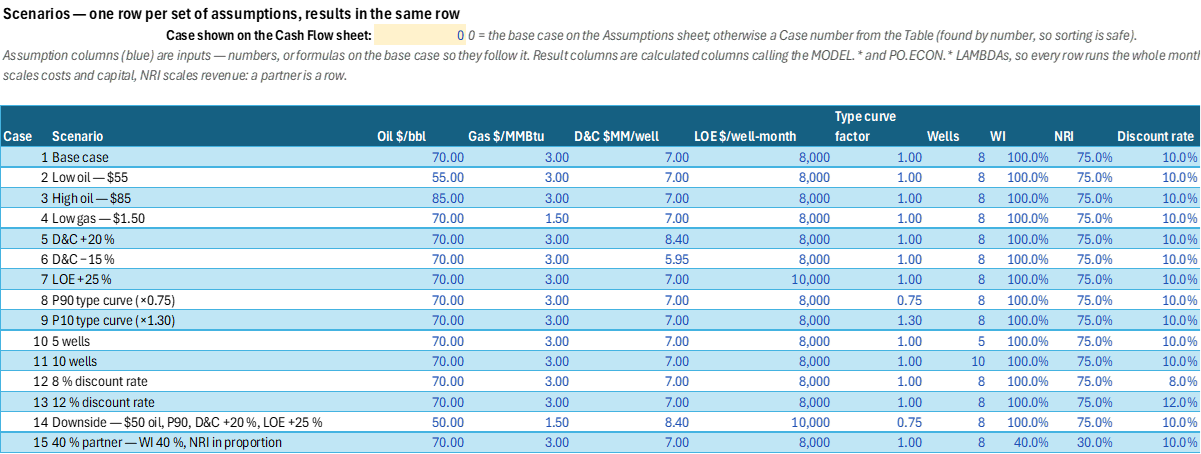
The economics of a small Texas horizontal program (5–10 wells), modelled month by month, with one scenario per row of an Excel Table. Each row carries its assumptions — prices, D&C, LOE, type-curve factor, well count, working and net revenue interest, discount rate — and, in the same row, its NPV, IRR, payout, PV/I, EUR per well and net cash. Change a row or add one at the bottom and its results fill in. The default assumptions are illustrative, not a price deck.
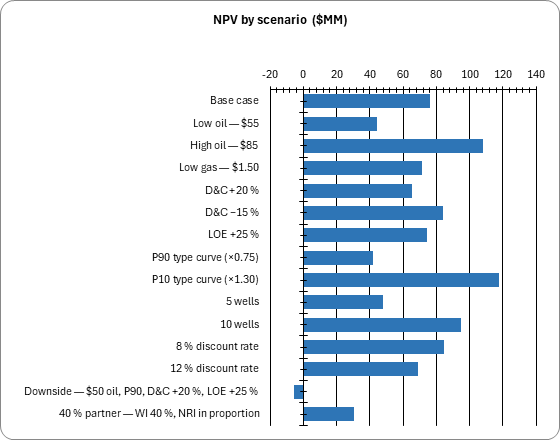
Wells come online one every few months and are drilled the month before. Each follows an Arps hyperbolic type curve switching to an exponential terminal decline, sampled at mid-month, with gas from a constant GOR, and produces until its operating margin reaches zero (the economic limit) or a life cap, then is plugged. Net revenue is the NRI share; Texas severance (4.6 % oil, 7.5 % gas) is charged on the oil and gas value and ad valorem on net revenue; costs and capital are the WI share. IRR is the monthly IRR annualised, found by bracketing the economic root so that the spurious negative root a plugging cost creates at low prices is not mistaken for it.
A partner is a row: its own WI and NRI scale the costs and the revenue, so a 40 % partner at the same revenue-to-working-interest ratio earns exactly 40 % of the base NPV. One annual escalation rate applies to prices and operating costs. Price decks, risked or Monte Carlo economics, reserves booking and fiscal regimes beyond the Texas taxes are not in version 1.
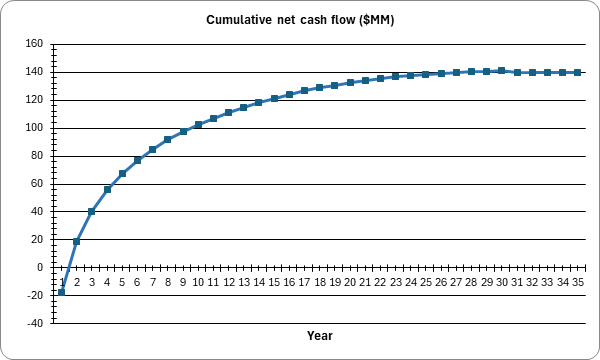
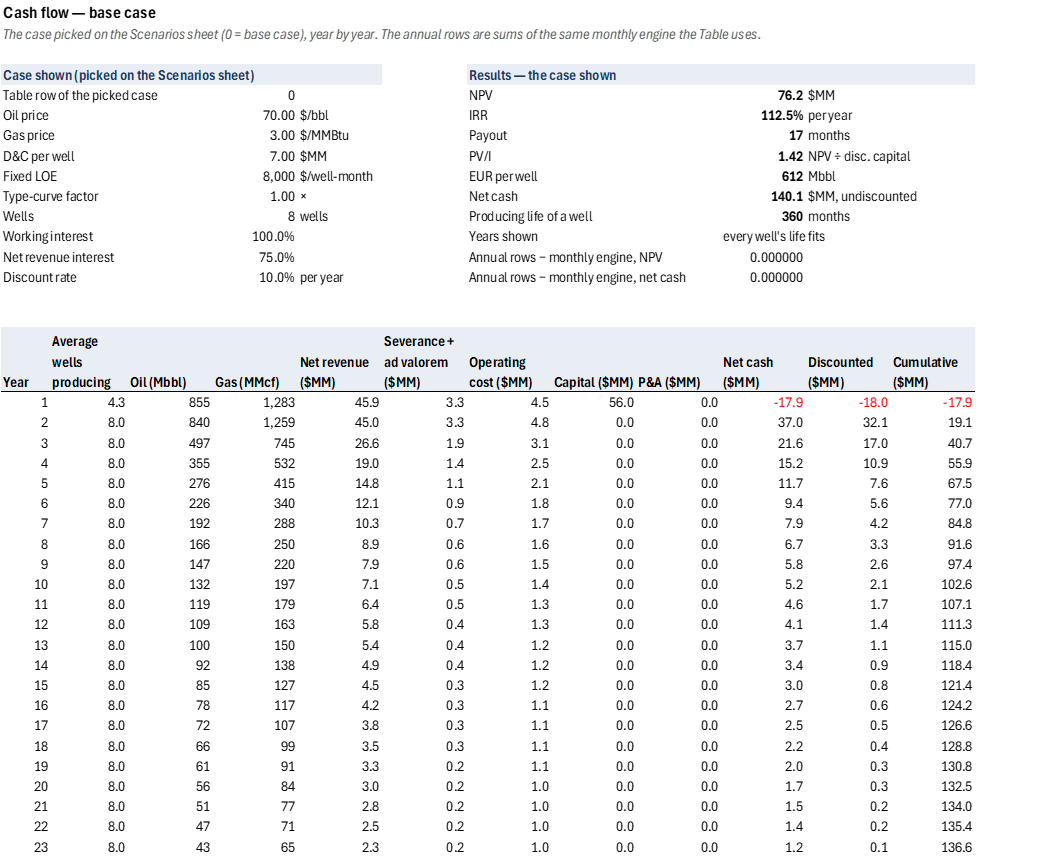
The Cash Flow sheet is the audit of one case, picked by number on the Scenarios sheet: the program year by year, from the same monthly engine, with lines that show the annual rows reconcile to it.
The engine is workbook LAMBDAs, named in the catalog's style so they can be promoted: PO.ECON.Arps.Di,
PO.ECON.Arps.Rate, PO.ECON.Arps.Time, PO.ECON.NPV.Monthly, PO.ECON.IRR.Monthly and
PO.ECON.Payout, and the MODEL.* functions that bind this workbook's assumptions.
Inputs
Named cells you can edit — every result recalculates from them. A Scenarios row can override any of its assumption columns with a number or a formula.
| Name | Description | Default | Unit |
|---|---|---|---|
EC_Wells |
Wells in the program | 8 | wells |
EC_FirstOnline, EC_Spacing |
First well online, months between wells | 3, 1 | month, months |
EC_LifeCap |
Longest producing life of a well | 360 | months |
EC_IP |
Initial oil rate, one well | 800 | bbl/d |
EC_b, EC_Dei, EC_Dterm |
Arps exponent, initial and terminal decline | 1.0, 65 %, 8 % | —, per year |
EC_GOR, EC_TC |
Gas–oil ratio, type-curve factor | 1500, 1.0 | scf/bbl, × |
EC_Oil, EC_OilDiff, EC_Gas, EC_GasDiff |
Prices and differentials | 70, 1.5, 3.0, 1.0 | $/bbl, $/MMBtu |
EC_Esc |
Escalation, prices and operating costs | 0 % | per year |
EC_WI, EC_NRI |
Working and net revenue interest | 100 %, 75 % | — |
EC_SevOil, EC_SevGas, EC_AdVal |
Texas severance and ad valorem taxes | 4.6 %, 7.5 %, 2.5 % | of value |
EC_DC |
Drilling and completion, per well | 7.0 | $MM |
EC_LOE, EC_LOEVar, EC_Gath, EC_PA |
Fixed LOE, variable LOE, gathering, plugging | 8000, 4, 0.5, 150000 | $/well-month, $/bbl, $/Mcf, $ |
EC_Disc, EC_Hurdle |
Discount rate, IRR hurdle | 10 %, 15 % | per year |
EC_Pick |
Case shown on Cash Flow (0 = base case) | 0 | — |
4 sheets, shown with the values the file opens with
| A | |
|---|---|
| 1 | Well-program economics — one scenario per row |
| 2 | |
| 3 | What this is |
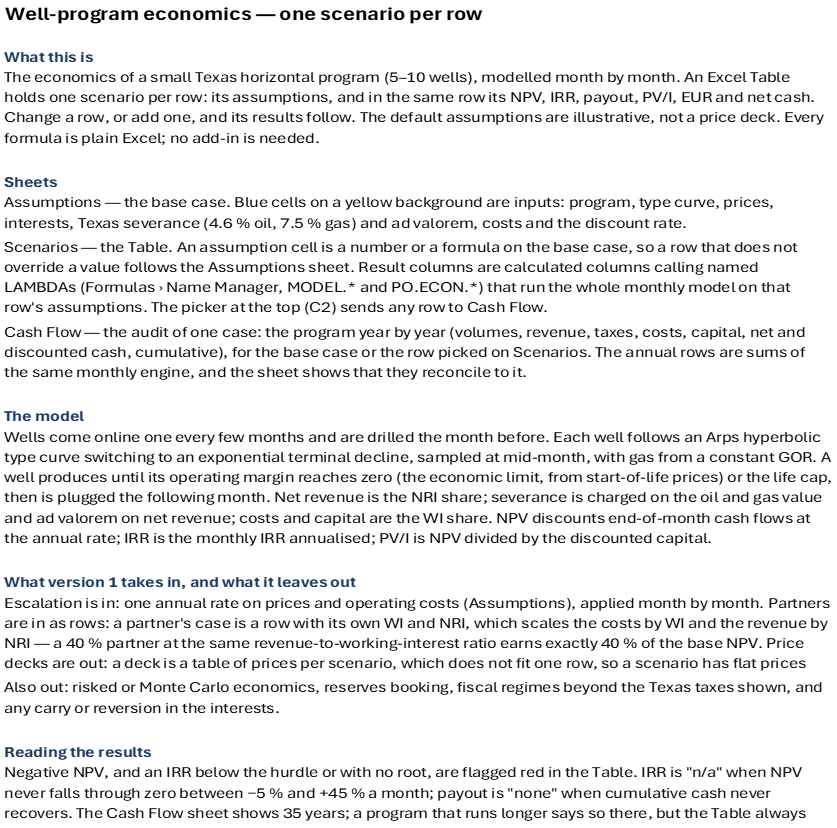
| 4 | The economics of a small Texas horizontal program (5–10 wells), modelled month by month. An Excel Table holds one scenario per row: its assumptions, and in the same row its NPV, IRR, payout, PV/I, EUR and net cash. Change a row, or add one, and its results follow. The default assumptions are illustrative, not a price deck. Every formula is plain Excel; no add-in is needed. |
| 5 | |
| 6 | Sheets |
| 7 | Assumptions — the base case. Blue cells on a yellow background are inputs: program, type curve, prices, interests, Texas severance (4.6 % oil, 7.5 % gas) and ad valorem, costs and the discount rate. |
| 8 | Scenarios — the Table. An assumption cell is a number or a formula on the base case, so a row that does not override a value follows the Assumptions sheet. Result columns are calculated columns calling named LAMBDAs (Formulas › Name Manager, MODEL.* and PO.ECON.*) that run the whole monthly model on that row's assumptions. The picker at the top (C2) sends any row to Cash Flow. |
| 9 | Cash Flow — the audit of one case: the program year by year (volumes, revenue, taxes, costs, capital, net and discounted cash, cumulative), for the base case or the row picked on Scenarios. The annual rows are sums of the same monthly engine, and the sheet shows that they reconcile to it. |
| 10 | |
| 11 | The model |
| 12 | Wells come online one every few months and are drilled the month before. Each well follows an Arps hyperbolic type curve switching to an exponential terminal decline, sampled at mid-month, with gas from a constant GOR. A well produces until its operating margin reaches zero (the economic limit, from start-of-life prices) or the life cap, then is plugged the following month. Net revenue is the NRI share; severance is charged on the oil and gas value and ad valorem on net revenue; costs and capital are the WI share. NPV discounts end-of-month cash flows at the annual rate; IRR is the monthly IRR annualised; PV/I is NPV divided by the discounted capital. |
| 13 | |
| 14 | What version 1 takes in, and what it leaves out |
| 15 | Escalation is in: one annual rate on prices and operating costs (Assumptions), applied month by month. Partners are in as rows: a partner's case is a row with its own WI and NRI, which scales the costs by WI and the revenue by NRI — a 40 % partner at the same revenue-to-working-interest ratio earns exactly 40 % of the base NPV. Price decks are out: a deck is a table of prices per scenario, which does not fit one row, so a scenario has flat prices (plus escalation). |
| 16 | Also out: risked or Monte Carlo economics, reserves booking, fiscal regimes beyond the Texas taxes shown, and any carry or reversion in the interests. |
| 17 | |
| 18 | Reading the results |
| 19 | Negative NPV, and an IRR below the hurdle or with no root, are flagged red in the Table. IRR is "n/a" when NPV never falls through zero between −5 % and +45 % a month; payout is "none" when cumulative cash never recovers. The Cash Flow sheet shows 35 years; a program that runs longer says so there, but the Table always uses the whole life. |
| A | B | C | D | |
|---|---|---|---|---|
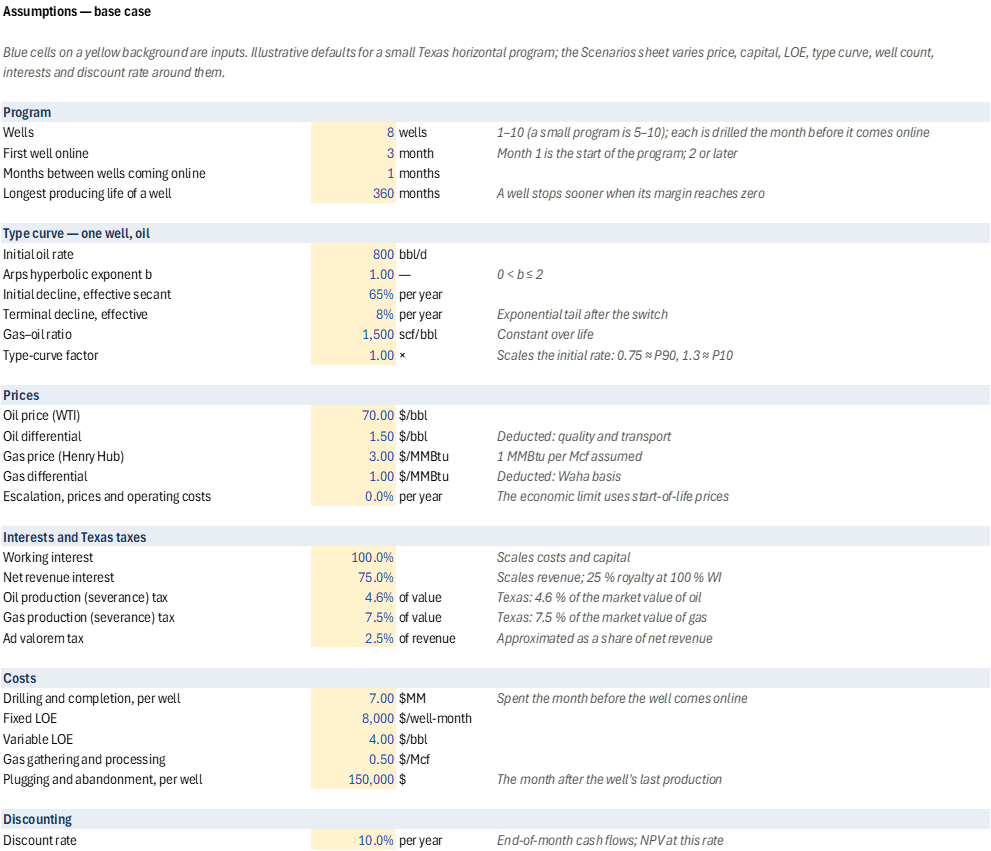
| 1 | Assumptions — base case | |||
| 2 | Blue cells on a yellow background are inputs. Illustrative defaults for a small Texas horizontal program; the Scenarios sheet varies price, capital, LOE, type curve, well count, interests and discount rate around them. | |||
| 3 | ||||
| 4 | Program | |||
| 5 | Wells | 8 | wells | 1–10 (a small program is 5–10); each is drilled the month before it comes online |
| 6 | First well online | 3 | month | Month 1 is the start of the program; 2 or later |
| 7 | Months between wells coming online | 1 | months | |
| 8 | Longest producing life of a well | 360 | months | A well stops sooner when its margin reaches zero |
| 9 | ||||
| 10 | Type curve — one well, oil | |||
| 11 | Initial oil rate | 800 | bbl/d | |
| 12 | Arps hyperbolic exponent b | 1.00 | — | 0 < b ≤ 2 |
| 13 | Initial decline, effective secant | 65% | per year | |
| 14 | Terminal decline, effective | 8% | per year | Exponential tail after the switch |
| 15 | Gas–oil ratio | 1,500 | scf/bbl | Constant over life |
| 16 | Type-curve factor | 1.00 | × | Scales the initial rate: 0.75 ≈ P90, 1.3 ≈ P10 |
| 17 | ||||
| 18 | Prices | |||
| 19 | Oil price (WTI) | 70.00 | $/bbl | |
| 20 | Oil differential | 1.50 | $/bbl | Deducted: quality and transport |
| 21 | Gas price (Henry Hub) | 3.00 | $/MMBtu | 1 MMBtu per Mcf assumed |
| 22 | Gas differential | 1.00 | $/MMBtu | Deducted: Waha basis |
| 23 | Escalation, prices and operating costs | 0.0% | per year | The economic limit uses start-of-life prices |
| 24 | ||||
| 25 | Interests and Texas taxes | |||
| 26 | Working interest | 100.0% | Scales costs and capital | |
| 27 | Net revenue interest | 75.0% | Scales revenue; 25 % royalty at 100 % WI | |
| 28 | Oil production (severance) tax | 4.6% | of value | Texas: 4.6 % of the market value of oil |
| 29 | Gas production (severance) tax | 7.5% | of value | Texas: 7.5 % of the market value of gas |
| 30 | Ad valorem tax | 2.5% | of revenue | Approximated as a share of net revenue |
| 31 | ||||
| 32 | Costs | |||
| 33 | Drilling and completion, per well | 7.00 | $MM | Spent the month before the well comes online |
| 34 | Fixed LOE | 8,000 | $/well-month | |
| 35 | Variable LOE | 4.00 | $/bbl | |
| 36 | Gas gathering and processing | 0.50 | $/Mcf | |
| 37 | Plugging and abandonment, per well | 150,000 | $ | The month after the well's last production |
| 38 | ||||
| 39 | Discounting | |||
| 40 | Discount rate | 10.0% | per year | End-of-month cash flows; NPV at this rate |
| 41 | IRR hurdle | 15.0% | per year | IRR below this is flagged red on the Scenarios sheet |
| A | B | C | D | E | F | G | H | I | J | K | L | M | N | O | P | Q | R | S | T | U | V | W | X | Y | Z | AA | |
|---|---|---|---|---|---|---|---|---|---|---|---|---|---|---|---|---|---|---|---|---|---|---|---|---|---|---|---|
| 1 | Scenarios — one row per set of assumptions, results in the same row | ||||||||||||||||||||||||||
| 2 | Case shown on the Cash Flow sheet: | 0 | 0 = the base case on the Assumptions sheet; otherwise a Case number from the Table (found by number, so sorting is safe). | ||||||||||||||||||||||||
| 3 | Assumption columns (blue) are inputs — numbers, or formulas on the base case so they follow it. Result columns are calculated columns calling the MODEL.* and PO.ECON.* LAMBDAs, so every row runs the whole monthly model on its own assumptions. Add a row at the bottom of the Table and its results fill in. WI scales costs and capital, NRI scales revenue: a partner is a row. | ||||||||||||||||||||||||||
| 4 | |||||||||||||||||||||||||||
| 5 | Case | Scenario | Oil $/bbl | Gas $/MMBtu | D&C $MM/well | LOE $/well-month | Type curve factor | Wells | WI | NRI | Discount rate | NPV $MM | IRR | Payout months | PV/I | EUR Mbbl/well | Net cash $MM | ||||||||||
| 6 | 1 | Base case | 70.00 | 3.00 | 7.00 | 8,000 | 1.00 | 8 | 100.0% | 75.0% | 10.0% | 76.2 | 112.5% | 17 | 1.42 | 612 | 140.1 | ||||||||||
| 7 | 2 | Low oil — $55 | 55.00 | 3.00 | 7.00 | 8,000 | 1.00 | 8 | 100.0% | 75.0% | 10.0% | 44.4 | 57.8% | 24 | 0.83 | 612 | 88.9 | ||||||||||
| 8 | 3 | High oil — $85 | 85.00 | 3.00 | 7.00 | 8,000 | 1.00 | 8 | 100.0% | 75.0% | 10.0% | 108.1 | 190.3% | 14 | 2.02 | 612 | 191.2 | ||||||||||
| 9 | 4 | Low gas — $1.50 | 70.00 | 1.50 | 7.00 | 8,000 | 1.00 | 8 | 100.0% | 75.0% | 10.0% | 71.6 | 103.2% | 18 | 1.34 | 612 | 132.6 | ||||||||||
| 10 | 5 | D&C +20 % | 70.00 | 3.00 | 8.40 | 8,000 | 1.00 | 8 | 100.0% | 75.0% | 10.0% | 65.5 | 72.0% | 21 | 1.02 | 612 | 128.9 | ||||||||||
| 11 | 6 | D&C −15 % | 70.00 | 3.00 | 5.95 | 8,000 | 1.00 | 8 | 100.0% | 75.0% | 10.0% | 84.3 | 168.1% | 15 | 1.85 | 612 | 148.5 | ||||||||||
| 12 | 7 | LOE +25 % | 70.00 | 3.00 | 7.00 | 10,000 | 1.00 | 8 | 100.0% | 75.0% | 10.0% | 74.4 | 111.2% | 17 | 1.39 | 612 | 134.3 | ||||||||||
| 13 | 8 | P90 type curve (×0.75) | 70.00 | 3.00 | 7.00 | 8,000 | 0.75 | 8 | 100.0% | 75.0% | 10.0% | 41.9 | 54.4% | 24 | 0.78 | 458 | 85.0 | ||||||||||
| 14 | 9 | P10 type curve (×1.30) | 70.00 | 3.00 | 7.00 | 8,000 | 1.30 | 8 | 100.0% | 75.0% | 10.0% | 117.4 | 218.4% | 14 | 2.19 | 796 | 206.2 | ||||||||||
| 15 | 10 | 5 wells | 70.00 | 3.00 | 7.00 | 8,000 | 1.00 | 5 | 100.0% | 75.0% | 10.0% | 48.2 | 112.5% | 16 | 1.42 | 612 | 87.5 | ||||||||||
| 16 | 11 | 10 wells | 70.00 | 3.00 | 7.00 | 8,000 | 1.00 | 10 | 100.0% | 75.0% | 10.0% | 94.5 | 112.5% | 18 | 1.42 | 612 | 175.1 | ||||||||||
| 17 | 12 | 8 % discount rate | 70.00 | 3.00 | 7.00 | 8,000 | 1.00 | 8 | 100.0% | 75.0% | 8.0% | 84.5 | 112.5% | 17 | 1.56 | 612 | 140.1 | ||||||||||
| 18 | 13 | 12 % discount rate | 70.00 | 3.00 | 7.00 | 8,000 | 1.00 | 8 | 100.0% | 75.0% | 12.0% | 69.2 | 112.5% | 17 | 1.30 | 612 | 140.1 | ||||||||||
| 19 | 14 | Downside — $50 oil, P90, D&C +20 %, LOE +25 % | 50.00 | 1.50 | 8.40 | 10,000 | 0.75 | 8 | 100.0% | 75.0% | 10.0% | -5.8 | 6.0% | 92 | -0.09 | 435 | 13.3 | ||||||||||
| 20 | 15 | 40 % partner — WI 40 %, NRI in proportion | 70.00 | 3.00 | 7.00 | 8,000 | 1.00 | 8 | 40.0% | 30.0% | 10.0% | 30.5 | 112.5% | 17 | 1.42 | 612 | 56.0 | ||||||||||
| 21 | |||||||||||||||||||||||||||
| 22 | |||||||||||||||||||||||||||
| 23 | |||||||||||||||||||||||||||
| 24 | |||||||||||||||||||||||||||
| 25 |
| A | B | C | D | E | F | G | H | I | J | K | L | M | N | O | P | Q | R | S | T | U | V | W | X | |
|---|---|---|---|---|---|---|---|---|---|---|---|---|---|---|---|---|---|---|---|---|---|---|---|---|
| 1 | Cash flow — base case | |||||||||||||||||||||||
| 2 | The case picked on the Scenarios sheet (0 = base case), year by year. The annual rows are sums of the same monthly engine the Table uses. | |||||||||||||||||||||||
| 3 | ||||||||||||||||||||||||
| 4 | Case shown (picked on the Scenarios sheet) | Results — the case shown | ||||||||||||||||||||||
| 5 | Table row of the picked case | 0 | NPV | 76.2 | $MM | |||||||||||||||||||
| 6 | Oil price | 70.00 | $/bbl | IRR | 112.5% | per year | ||||||||||||||||||
| 7 | Gas price | 3.00 | $/MMBtu | Payout | 17 | months | ||||||||||||||||||
| 8 | D&C per well | 7.00 | $MM | PV/I | 1.42 | NPV ÷ disc. capital | ||||||||||||||||||
| 9 | Fixed LOE | 8,000 | $/well-month | EUR per well | 612 | Mbbl | ||||||||||||||||||
| 10 | Type-curve factor | 1.00 | × | Net cash | 140.1 | $MM, undiscounted | ||||||||||||||||||
| 11 | Wells | 8 | wells | Producing life of a well | 360 | months | ||||||||||||||||||
| 12 | Working interest | 100.0% | Years shown | every well's life fits | ||||||||||||||||||||
| 13 | Net revenue interest | 75.0% | Annual rows − monthly engine, NPV | 0.000000 | ||||||||||||||||||||
| 14 | Discount rate | 10.0% | per year | Annual rows − monthly engine, net cash | -0.000000 | |||||||||||||||||||
| 15 | ||||||||||||||||||||||||
| 16 | ||||||||||||||||||||||||
| 17 | Year | Average wells producing | Oil (Mbbl) | Gas (MMcf) | Net revenue ($MM) | Severance + ad valorem ($MM) | Operating cost ($MM) | Capital ($MM) | P&A ($MM) | Net cash ($MM) | Discounted ($MM) | Cumulative ($MM) | ||||||||||||
| 18 | 1 | 4.3 | 855 | 1,283 | 45.9 | 3.3 | 4.5 | 56.0 | 0.0 | -17.9 | -18.0 | -17.9 | ||||||||||||
| 19 | 2 | 8.0 | 840 | 1,259 | 45.0 | 3.3 | 4.8 | 0.0 | 0.0 | 37.0 | 32.1 | 19.1 | ||||||||||||
| 20 | 3 | 8.0 | 497 | 745 | 26.6 | 1.9 | 3.1 | 0.0 | 0.0 | 21.6 | 17.0 | 40.7 | ||||||||||||
| 21 | 4 | 8.0 | 355 | 532 | 19.0 | 1.4 | 2.5 | 0.0 | 0.0 | 15.2 | 10.9 | 55.9 | ||||||||||||
| 22 | 5 | 8.0 | 276 | 415 | 14.8 | 1.1 | 2.1 | 0.0 | 0.0 | 11.7 | 7.6 | 67.5 | ||||||||||||
| 23 | 6 | 8.0 | 226 | 340 | 12.1 | 0.9 | 1.8 | 0.0 | 0.0 | 9.4 | 5.6 | 77.0 | ||||||||||||
| 24 | 7 | 8.0 | 192 | 288 | 10.3 | 0.7 | 1.7 | 0.0 | 0.0 | 7.9 | 4.2 | 84.8 | ||||||||||||
| 25 | 8 | 8.0 | 166 | 250 | 8.9 | 0.6 | 1.6 | 0.0 | 0.0 | 6.7 | 3.3 | 91.6 | ||||||||||||
| 26 | 9 | 8.0 | 147 | 220 | 7.9 | 0.6 | 1.5 | 0.0 | 0.0 | 5.8 | 2.6 | 97.4 | ||||||||||||
| 27 | 10 | 8.0 | 132 | 197 | 7.1 | 0.5 | 1.4 | 0.0 | 0.0 | 5.2 | 2.1 | 102.6 | ||||||||||||
| 28 | 11 | 8.0 | 119 | 179 | 6.4 | 0.5 | 1.3 | 0.0 | 0.0 | 4.6 | 1.7 | 107.1 | ||||||||||||
| 29 | 12 | 8.0 | 109 | 163 | 5.8 | 0.4 | 1.3 | 0.0 | 0.0 | 4.1 | 1.4 | 111.3 | ||||||||||||
| 30 | 13 | 8.0 | 100 | 150 | 5.4 | 0.4 | 1.2 | 0.0 | 0.0 | 3.7 | 1.1 | 115.0 | ||||||||||||
| 31 | 14 | 8.0 | 92 | 138 | 4.9 | 0.4 | 1.2 | 0.0 | 0.0 | 3.4 | 0.9 | 118.4 | ||||||||||||
| 32 | 15 | 8.0 | 85 | 127 | 4.5 | 0.3 | 1.2 | 0.0 | 0.0 | 3.0 | 0.8 | 121.4 | ||||||||||||
| 33 | 16 | 8.0 | 78 | 117 | 4.2 | 0.3 | 1.1 | 0.0 | 0.0 | 2.7 | 0.6 | 124.2 | ||||||||||||
| 34 | 17 | 8.0 | 72 | 107 | 3.8 | 0.3 | 1.1 | 0.0 | 0.0 | 2.5 | 0.5 | 126.6 | ||||||||||||
| 35 | 18 | 8.0 | 66 | 99 | 3.5 | 0.3 | 1.1 | 0.0 | 0.0 | 2.2 | 0.4 | 128.8 | ||||||||||||
| 36 | 19 | 8.0 | 61 | 91 | 3.3 | 0.2 | 1.1 | 0.0 | 0.0 | 2.0 | 0.3 | 130.8 | ||||||||||||
| 37 | 20 | 8.0 | 56 | 84 | 3.0 | 0.2 | 1.0 | 0.0 | 0.0 | 1.7 | 0.3 | 132.5 | ||||||||||||
| 38 | 21 | 8.0 | 51 | 77 | 2.8 | 0.2 | 1.0 | 0.0 | 0.0 | 1.5 | 0.2 | 134.0 | ||||||||||||
| 39 | 22 | 8.0 | 47 | 71 | 2.5 | 0.2 | 1.0 | 0.0 | 0.0 | 1.4 | 0.2 | 135.4 | ||||||||||||
| 40 | 23 | 8.0 | 43 | 65 | 2.3 | 0.2 | 1.0 | 0.0 | 0.0 | 1.2 | 0.1 | 136.6 | ||||||||||||
| 41 | 24 | 8.0 | 40 | 60 | 2.1 | 0.2 | 1.0 | 0.0 | 0.0 | 1.0 | 0.1 | 137.6 | ||||||||||||
| 42 | 25 | 8.0 | 37 | 55 | 2.0 | 0.1 | 0.9 | 0.0 | 0.0 | 0.9 | 0.1 | 138.5 | ||||||||||||
| 43 | 26 | 8.0 | 34 | 51 | 1.8 | 0.1 | 0.9 | 0.0 | 0.0 | 0.8 | 0.1 | 139.3 | ||||||||||||
| 44 | 27 | 8.0 | 31 | 47 | 1.7 | 0.1 | 0.9 | 0.0 | 0.0 | 0.6 | 0.1 | 139.9 | ||||||||||||
| 45 | 28 | 8.0 | 29 | 43 | 1.5 | 0.1 | 0.9 | 0.0 | 0.0 | 0.5 | 0.0 | 140.4 | ||||||||||||
| 46 | 29 | 8.0 | 26 | 40 | 1.4 | 0.1 | 0.9 | 0.0 | 0.0 | 0.4 | 0.0 | 140.8 | ||||||||||||
| 47 | 30 | 8.0 | 24 | 36 | 1.3 | 0.1 | 0.9 | 0.0 | 0.0 | 0.3 | 0.0 | 141.2 | ||||||||||||
| 48 | 31 | 3.7 | 10 | 16 | 0.6 | 0.0 | 0.4 | 0.0 | 1.2 | -1.1 | -0.1 | 140.1 | ||||||||||||
| 49 | 32 | 0.0 | 0 | 0 | 0.0 | 0.0 | 0.0 | 0.0 | 0.0 | 0.0 | 0.0 | 140.1 | ||||||||||||
| 50 | 33 | 0.0 | 0 | 0 | 0.0 | 0.0 | 0.0 | 0.0 | 0.0 | 0.0 | 0.0 | 140.1 | ||||||||||||
| 51 | 34 | 0.0 | 0 | 0 | 0.0 | 0.0 | 0.0 | 0.0 | 0.0 | 0.0 | 0.0 | 140.1 | ||||||||||||
| 52 | 35 | 0.0 | 0 | 0 | 0.0 | 0.0 | 0.0 | 0.0 | 0.0 | 0.0 | 0.0 | 140.1 | ||||||||||||
| 53 | Total | 4,896 | 7,343 | 262.5 | 19.0 | 46.3 | 56.0 | 1.2 | 140.1 | 76.2 |
| Name | Refers To | Comment |
|---|---|---|
| MODEL.Annual | =LAMBDA(oil_price,gas_price,dc_mm,loe_fixed,tc_factor,well_count,wi_frac,nri_frac,disc_rate,year_count,LET(monthly_matrix,MODEL.Monthly(oil_price,gas_price,dc_mm,loe_fixed,tc_factor,well_count,wi_frac,nri_frac),month_no,CHOOSECOLS(monthly_matrix,1),net_cash,CHOOSECOLS(monthly_matrix,5)-CHOOSECOLS(monthly_matrix,6)-CHOOSECOLS(monthly_matrix,7)-CHOOSECOLS(monthly_matrix,8)-CHOOSECOLS(monthly_matrix,9),scaled,HSTACK(CHOOSECOLS(monthly_matrix,2)/12,CHOOSECOLS(monthly_matrix,3)/1000,CHOOSECOLS(monthly_matrix,4)/1000,CHOOSECOLS(monthly_matrix,5)/1000000,CHOOSECOLS(monthly_matrix,6)/1000000,CHOOSECOLS(monthly_matrix,7)/1000000,CHOOSECOLS(monthly_matrix,8)/1000000,CHOOSECOLS(monthly_matrix,9)/1000000,net_cash/1000000,net_cash/(1+disc_rate)^(month_no/12)/1000000),in_year,(month_no>12*(SEQUENCE(1,year_count)-1))*(month_no<=12*SEQUENCE(1,year_count)),HSTACK(SEQUENCE(year_count),MMULT(TRANSPOSE(in_year),scaled)))) | |
| MODEL.Capex | =LAMBDA(dc_mm,well_count,wi_frac,LET(month,SEQUENCE(EC_FirstOnline+(well_count-1)*EC_Spacing+EC_LifeCap+1),online,EC_FirstOnline+(SEQUENCE(1,well_count)-1)*EC_Spacing,dc_mm*1000000*wi_frac*MMULT((month=online-1)*1,SEQUENCE(well_count,1,1,0)))) | |
| MODEL.CashFlow | =LAMBDA(oil_price,gas_price,dc_mm,loe_fixed,tc_factor,well_count,wi_frac,nri_frac,LET(monthly_matrix,MODEL.Monthly(oil_price,gas_price,dc_mm,loe_fixed,tc_factor,well_count,wi_frac,nri_frac),CHOOSECOLS(monthly_matrix,5)-CHOOSECOLS(monthly_matrix,6)-CHOOSECOLS(monthly_matrix,7)-CHOOSECOLS(monthly_matrix,8)-CHOOSECOLS(monthly_matrix,9))) | |
| MODEL.EUR | =LAMBDA(oil_price,gas_price,loe_fixed,tc_factor,wi_frac,nri_frac,LET(q_init,EC_IP*tc_factor,d_init,PO.ECON.Arps.Di(EC_b,EC_Dei),d_term,-LN(1-EC_Dterm),life_months,MODEL.Life(q_init,oil_price,gas_price,loe_fixed,wi_frac,nri_frac),IF(life_months=0,0,SUM(PO.ECON.Arps.Rate(q_init,EC_b,d_init,d_term,(SEQUENCE(life_months)-0.5)/12))*30.4375))) | |
| MODEL.Life | =LAMBDA(q_init,oil_price,gas_price,loe_fixed,wi_frac,nri_frac,LET(d_init,PO.ECON.Arps.Di(EC_b,EC_Dei),d_term,-LN(1-EC_Dterm),margin,(oil_price-EC_OilDiff)*nri_frac*(1-EC_SevOil-EC_AdVal)+EC_GOR/1000*((gas_price-EC_GasDiff)*nri_frac*(1-EC_SevGas-EC_AdVal)-EC_Gath*wi_frac)-EC_LOEVar*wi_frac,IF(margin<=0,0,IF(loe_fixed<=0,EC_LifeCap,MIN(EC_LifeCap,INT(12*PO.ECON.Arps.Time(q_init,EC_b,d_init,d_term,loe_fixed*wi_frac/(30.4375*margin)))))))) | |
| MODEL.Monthly | =LAMBDA(oil_price,gas_price,dc_mm,loe_fixed,tc_factor,well_count,wi_frac,nri_frac,LET(q_init,EC_IP*tc_factor,d_init,PO.ECON.Arps.Di(EC_b,EC_Dei),d_term,-LN(1-EC_Dterm),life_months,MODEL.Life(q_init,oil_price,gas_price,loe_fixed,wi_frac,nri_frac),month,SEQUENCE(EC_FirstOnline+(well_count-1)*EC_Spacing+EC_LifeCap+1),online,EC_FirstOnline+(SEQUENCE(1,well_count)-1)*EC_Spacing,well_age,month-online+1,producing,(well_age>=1)*(well_age<=life_months),t_years,((well_age>=1)*well_age+(well_age<1)-0.5)/12,ones_col,SEQUENCE(well_count,1,1,0),oil_bbl,MMULT(producing*PO.ECON.Arps.Rate(q_init,EC_b,d_init,d_term,t_years)*30.4375,ones_col),wells_on,MMULT(producing,ones_col),gas_mcf,oil_bbl*EC_GOR/1000,escalation,(1+EC_Esc)^((month-1)/12),net_oil,oil_bbl*(oil_price-EC_OilDiff)*escalation*nri_frac,net_gas,gas_mcf*(gas_price-EC_GasDiff)*escalation*nri_frac,taxes,net_oil*EC_SevOil+net_gas*EC_SevGas+(net_oil+net_gas)*EC_AdVal,op_cost,(loe_fixed*wells_on+EC_LOEVar*oil_bbl+EC_Gath*gas_mcf)*wi_frac*escalation,plugging,EC_PA*wi_frac*MMULT((month=online+life_months)*1,ones_col),HSTACK(month,wells_on,oil_bbl,gas_mcf,net_oil+net_gas,taxes,op_cost,MODEL.Capex(dc_mm,well_count,wi_frac),plugging))) | |
| PO.ECON.Arps.Di | =LAMBDA(b_exp,d_secant,1/b_exp*((1-d_secant)^(-b_exp)-1)) | |
| PO.ECON.Arps.Rate | =LAMBDA(q_init,b_exp,d_init,d_term,t_years,LET(t_switch,MAX(0,(d_init/d_term-1)/(b_exp*d_init)),q_switch,q_init*(1+b_exp*d_init*t_switch)^(-1/b_exp),(t_years<=t_switch)*q_init*(1+b_exp*d_init*t_years)^(-1/b_exp)+(t_years>t_switch)*q_switch*EXP(-d_term*(t_years-t_switch)))) | |
| PO.ECON.Arps.Time | =LAMBDA(q_init,b_exp,d_init,d_term,q_limit,LET(t_switch,MAX(0,(d_init/d_term-1)/(b_exp*d_init)),q_switch,q_init*(1+b_exp*d_init*t_switch)^(-1/b_exp),IF(q_limit>=q_init,0,IF(q_limit>=q_switch,((q_init/q_limit)^b_exp-1)/(b_exp*d_init),t_switch+LN(q_switch/q_limit)/d_term)))) | |
| PO.ECON.IRR.Monthly | =LAMBDA(cash,LET(cash_col,cash,grid_step,0.0025,rates,SEQUENCE(1,201,-0.05,grid_step),periods,SEQUENCE(ROWS(cash_col)),npv_grid,MMULT(TRANSPOSE(cash_col),(1+rates)^(-periods)),first_pos,IFERROR(XMATCH(TRUE,npv_grid>0),0),crossing,IF(first_pos=0,0,IFERROR(XMATCH(1,(SEQUENCE(1,201)>first_pos)*(npv_grid<=0)),0)),IF(crossing=0,"n/a",LET(r_lo,INDEX(rates,1,crossing-1),v_lo,INDEX(npv_grid,1,crossing-1),v_hi,INDEX(npv_grid,1,crossing),r_interp,r_lo+grid_step*v_lo/(v_lo-v_hi),r_refined,IFERROR(IRR(cash_col,r_lo),r_interp),(1+IF(AND(r_refined>=r_lo,r_refined<=r_lo+grid_step),r_refined,r_interp))^12-1)))) | |
| PO.ECON.NPV.Monthly | =LAMBDA(cash,annual_rate,NPV((1+annual_rate)^(1/12)-1,cash)) | |
| PO.ECON.Payout | =LAMBDA(cash,LET(cumulative,SCAN(0,cash,LAMBDA(running,flow,running+flow)),trough,MATCH(MIN(cumulative),cumulative,0),IFERROR(MATCH(1,(SEQUENCE(ROWS(cumulative))>trough)*(cumulative>=0),0),"none"))) | |
| CF_DC | 'Cash Flow'!$D$8 | |
| CF_Disc | 'Cash Flow'!$D$14 | |
| CF_EUR | 'Cash Flow'!$J$9 | |
| CF_Gas | 'Cash Flow'!$D$7 | |
| CF_IRR | 'Cash Flow'!$J$6 | |
| CF_LOE | 'Cash Flow'!$D$9 | |
| CF_Life | 'Cash Flow'!$J$11 | |
| CF_NPV | 'Cash Flow'!$J$5 | |
| CF_NRI | 'Cash Flow'!$D$13 | |
| CF_NetCash | 'Cash Flow'!$J$10 | |
| CF_Oil | 'Cash Flow'!$D$6 | |
| CF_PVI | 'Cash Flow'!$J$8 | |
| CF_Payout | 'Cash Flow'!$J$7 | |
| CF_ReconNet | 'Cash Flow'!$J$14 | |
| CF_ReconNpv | 'Cash Flow'!$J$13 | |
| CF_Row | 'Cash Flow'!$D$5 | |
| CF_TC | 'Cash Flow'!$D$10 | |
| CF_WI | 'Cash Flow'!$D$12 | |
| CF_Wells | 'Cash Flow'!$D$11 | |
| EC_AdVal | Assumptions!$B$30 | |
| EC_DC | Assumptions!$B$33 | |
| EC_Dei | Assumptions!$B$13 | |
| EC_Disc | Assumptions!$B$40 | |
| EC_Dterm | Assumptions!$B$14 | |
| EC_Esc | Assumptions!$B$23 | |
| EC_FirstOnline | Assumptions!$B$6 | |
| EC_GOR | Assumptions!$B$15 | |
| EC_Gas | Assumptions!$B$21 | |
| EC_GasDiff | Assumptions!$B$22 | |
| EC_Gath | Assumptions!$B$36 | |
| EC_Hurdle | Assumptions!$B$41 | |
| EC_IP | Assumptions!$B$11 | |
| EC_LOE | Assumptions!$B$34 | |
| EC_LOEVar | Assumptions!$B$35 | |
| EC_LifeCap | Assumptions!$B$8 | |
| EC_NRI | Assumptions!$B$27 | |
| EC_Oil | Assumptions!$B$19 | |
| EC_OilDiff | Assumptions!$B$20 | |
| EC_PA | Assumptions!$B$37 | |
| EC_Pick | Scenarios!$C$2 | |
| EC_SevGas | Assumptions!$B$29 | |
| EC_SevOil | Assumptions!$B$28 | |
| EC_Spacing | Assumptions!$B$7 | |
| EC_TC | Assumptions!$B$16 | |
| EC_WI | Assumptions!$B$26 | |
| EC_Wells | Assumptions!$B$5 | |
| EC_b | Assumptions!$B$12 |
| Opens in | Works in any Excel: formulas and named LAMBDAs only, no add-in needed. |
| File | WellProgramEconomics.xlsx, 35 KB |
| Category | Economics |
| For agents and tools | Structure (.json) · Descriptor (.md) |