Unit Converter
Convert between 1,500+ petroleum engineering units — from the ribbon, in formulas, or online.
Three Ways to Convert
Use whichever method fits your workflow.
Ribbon Dropdowns
Quick visual conversions
- Select Category from the dropdown
- Choose From and To units
- Result updates instantly in the ribbon
Excel Function
=UnitConverter(Value, From, To)
- Use directly in cell formulas
- Supports unit expressions (bbl*psi/day)
- Supports scaled units (640 acre)
Online Converter
Convert from any device
- Browse all unit categories
- Interactive From/To selection
- Copy results and Excel formula syntax
In Excel: Unit Converter Pane
The Unit Converter task pane lets you pick a category, source, and target, type a value, and copy the result — or the matching =UnitConverter(...) formula — into your worksheet.
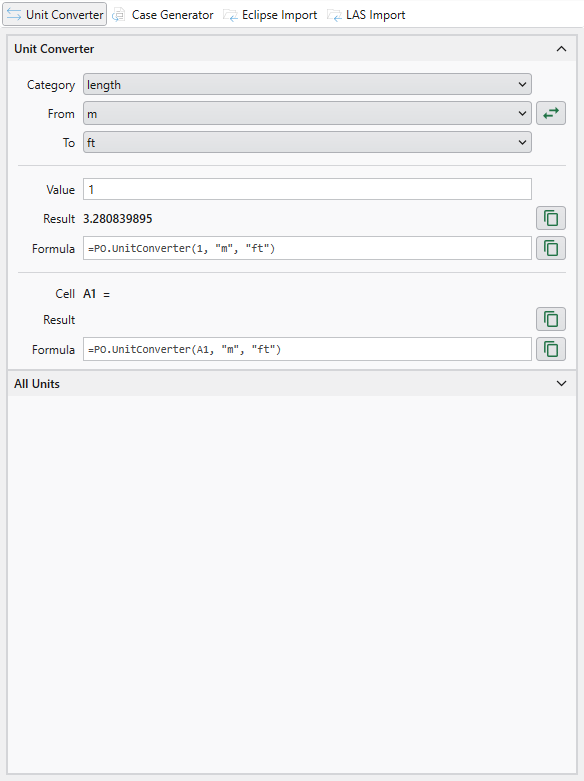
Pick a category, source, and target — the result and formula update as you type
Unit Types
Three kinds of units work with the UnitConverter() function.
Registered Units
1,500+ built-in units across 25 categories: pressure, temperature, length, area, volume, flow rates, density, viscosity, permeability, and more.
Scaled Units
Combine a number with a unit: "640 acre", "1000 ft". Useful for area and volume calculations.
Unit Expressions
Build custom units: "bbl*psi/day", "ft^3/min". Combine any registered units with * and ^.
Online Converter
Browse all unit categories and convert from any device.
Unit Categories
Browse all categories
- All unit categories in one place
- Pressure, temperature, length, volume, and more
- Click any category to start converting
Interactive Converter
Convert and copy
- Select From and To units with dropdowns
- See result instantly as you type
- Copy the Excel formula syntax