Completion Schematic — Live Wellbore from a Casing and Completion Table
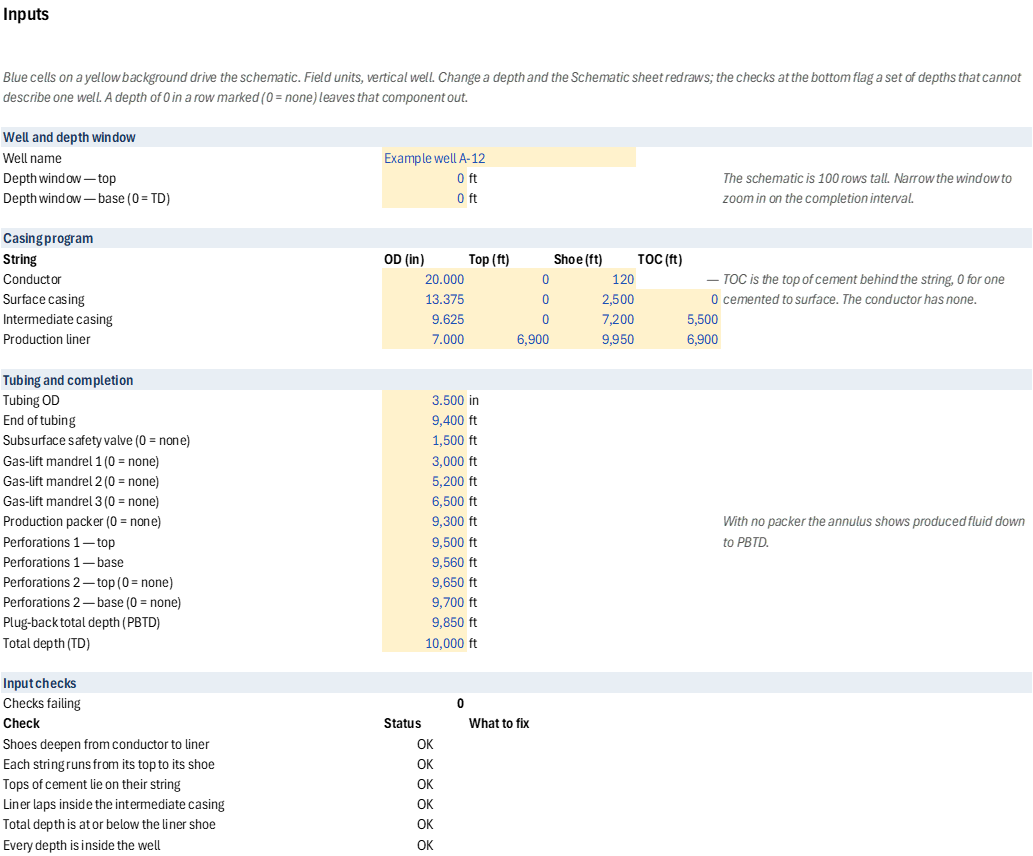
A completion schematic for a vertical well that redraws itself. Enter the casing program (OD, top, shoe and top of cement for the conductor, surface casing, intermediate casing and production liner) and the completion (tubing, safety valve, gas-lift mandrels, packer, two perforated intervals, PBTD and TD) on the Inputs sheet; the Schematic sheet paints the wellbore against depth and labels each component. Move a packer, a shoe, a perforation or a liner top and the drawing and its labels move with it.
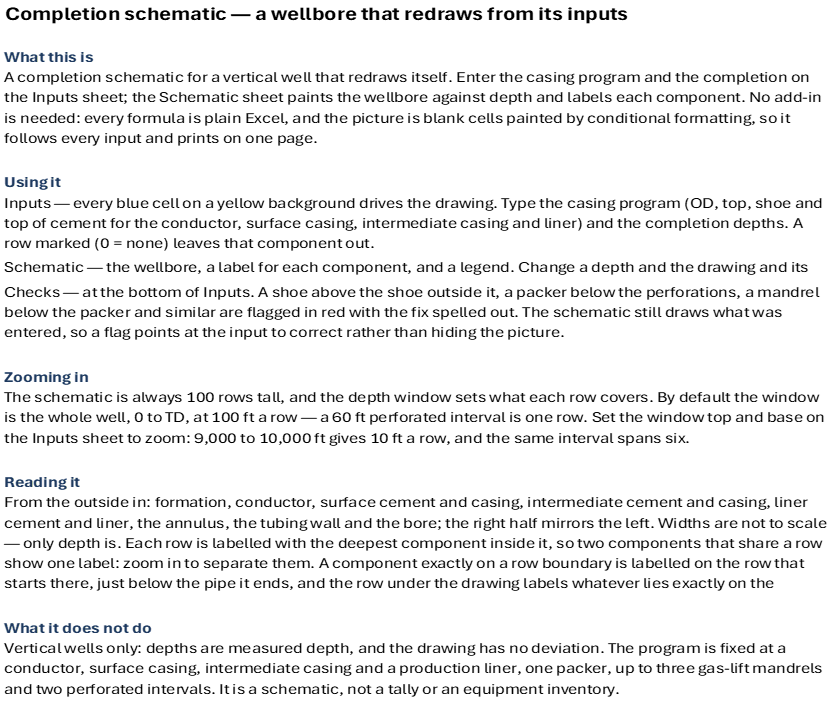
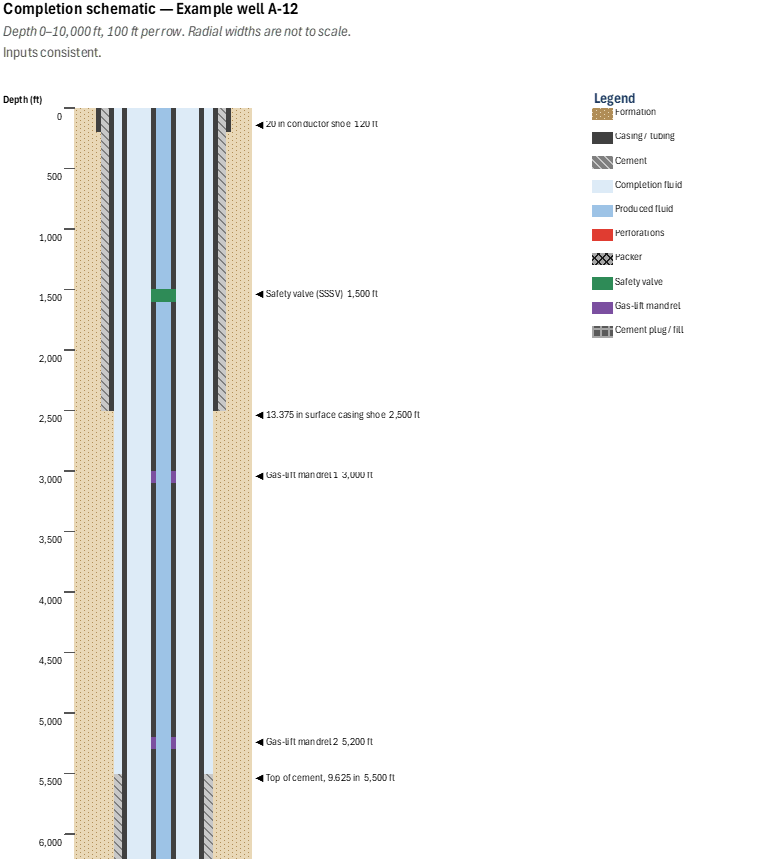
The drawing is cell art: blank cells painted by ordered conditional-format rules keyed on each row's depth and the named inputs. Every formula is plain Excel, so the workbook needs no add-in, and the Schematic sheet prints on one page.
The schematic is 100 rows tall and a depth window sets what each row covers. By default it is the whole well at 100 ft a row; set the window top and base to zoom in on the completion interval, where 10 ft a row turns a 60 ft perforated interval from one row into six. Radial widths are not to scale, as completion schematics never are.
Input checks flag a set of depths that cannot describe one well — shoes that do not deepen, a packer below the perforations, mandrels below the packer, a window that runs upward — in red with the fix spelled out. A depth of 0 in a row marked (0 = none) leaves that component out.
Inputs
Named cells you can edit — the drawing and its labels recalculate from them.
| Name | Description | Default | Unit |
|---|---|---|---|
CS_WellName |
Well name shown in the title | Example well A-12 | — |
CS_WinTop, CS_WinBase |
Depth window top and base (base 0 = TD) | 0, 0 | ft |
CS_CondOD, CS_SurfOD, CS_IntOD, CS_LinerOD |
Casing and liner OD | 20, 13.375, 9.625, 7 | in |
CS_*Top, CS_*Shoe |
String top and shoe | shoes 120, 2500, 7200, 9950 | ft |
CS_SurfTOC, CS_IntTOC, CS_LinerTOC |
Top of cement behind the surface, intermediate and liner strings | 0, 5500, 6900 | ft |
CS_TubingOD, CS_EOT |
Tubing OD and end of tubing | 3.5, 9400 | in, ft |
CS_SSSV |
Subsurface safety valve (0 = none) | 1500 | ft |
CS_GLM1–CS_GLM3 |
Gas-lift mandrels (0 = none) | 3000, 5200, 6500 | ft |
CS_Packer |
Production packer (0 = none) | 9300 | ft |
CS_Perf1Top–CS_Perf2Base |
Perforated intervals (second 0 = none) | 9500–9560, 9650–9700 | ft |
CS_PBTD, CS_TD |
Plug-back and total depth | 9850, 10000 | ft |
4 sheets, shown with the values the file opens with
| A | |
|---|---|
| 1 | Completion schematic — a wellbore that redraws from its inputs |
| 2 | |
| 3 | What this is |
| 4 | A completion schematic for a vertical well that redraws itself. Enter the casing program and the completion on the Inputs sheet; the Schematic sheet paints the wellbore against depth and labels each component. No add-in is needed: every formula is plain Excel, and the picture is blank cells painted by conditional formatting, so it follows every input and prints on one page. |
| 5 | |
| 6 | Using it |
| 7 | Inputs — every blue cell on a yellow background drives the drawing. Type the casing program (OD, top, shoe and top of cement for the conductor, surface casing, intermediate casing and liner) and the completion depths. A row marked (0 = none) leaves that component out. |
| 8 | Schematic — the wellbore, a label for each component, and a legend. Change a depth and the drawing and its labels move. |
| 9 | Checks — at the bottom of Inputs. A shoe above the shoe outside it, a packer below the perforations, a mandrel below the packer and similar are flagged in red with the fix spelled out. The schematic still draws what was entered, so a flag points at the input to correct rather than hiding the picture. |
| 10 | |
| 11 | Zooming in |
| 12 | The schematic is always 100 rows tall, and the depth window sets what each row covers. By default the window is the whole well, 0 to TD, at 100 ft a row — a 60 ft perforated interval is one row. Set the window top and base on the Inputs sheet to zoom: 9,000 to 10,000 ft gives 10 ft a row, and the same interval spans six. |
| 13 | |
| 14 | Reading it |
| 15 | From the outside in: formation, conductor, surface cement and casing, intermediate cement and casing, liner cement and liner, the annulus, the tubing wall and the bore; the right half mirrors the left. Widths are not to scale — only depth is. Each row is labelled with the deepest component inside it, so two components that share a row show one label: zoom in to separate them. A component exactly on a row boundary is labelled on the row that starts there, just below the pipe it ends, and the row under the drawing labels whatever lies exactly on the window's base. The legend names every material. |
| 16 | |
| 17 | What it does not do |
| 18 | Vertical wells only: depths are measured depth, and the drawing has no deviation. The program is fixed at a conductor, surface casing, intermediate casing and a production liner, one packer, up to three gas-lift mandrels and two perforated intervals. It is a schematic, not a tally or an equipment inventory. |
| A | B | C | D | E | F | |
|---|---|---|---|---|---|---|
| 1 | Inputs | |||||
| 2 | Blue cells on a yellow background drive the schematic. Field units, vertical well. Change a depth and the Schematic sheet redraws; the checks at the bottom flag a set of depths that cannot describe one well. A depth of 0 in a row marked (0 = none) leaves that component out. | |||||
| 3 | ||||||
| 4 | Well and depth window | |||||
| 5 | Well name | Example well A-12 | ||||
| 6 | Depth window — top | 0 | ft | The schematic is 100 rows tall. Narrow the window to zoom in on the completion interval. | ||
| 7 | Depth window — base (0 = TD) | 0 | ft | |||
| 8 | ||||||
| 9 | Casing program | |||||
| 10 | String | OD (in) | Top (ft) | Shoe (ft) | TOC (ft) | |
| 11 | Conductor | 20.000 | 0 | 120 | — | TOC is the top of cement behind the string, 0 for one cemented to surface. The conductor has none. |
| 12 | Surface casing | 13.375 | 0 | 2,500 | 0 | |
| 13 | Intermediate casing | 9.625 | 0 | 7,200 | 5,500 | |
| 14 | Production liner | 7.000 | 6,900 | 9,950 | 6,900 | |
| 15 | ||||||
| 16 | Tubing and completion | |||||
| 17 | Tubing OD | 3.500 | in | |||
| 18 | End of tubing | 9,400 | ft | |||
| 19 | Subsurface safety valve (0 = none) | 1,500 | ft | |||
| 20 | Gas-lift mandrel 1 (0 = none) | 3,000 | ft | |||
| 21 | Gas-lift mandrel 2 (0 = none) | 5,200 | ft | |||
| 22 | Gas-lift mandrel 3 (0 = none) | 6,500 | ft | |||
| 23 | Production packer (0 = none) | 9,300 | ft | With no packer the annulus shows produced fluid down to PBTD. | ||
| 24 | Perforations 1 — top | 9,500 | ft | |||
| 25 | Perforations 1 — base | 9,560 | ft | |||
| 26 | Perforations 2 — top (0 = none) | 9,650 | ft | |||
| 27 | Perforations 2 — base (0 = none) | 9,700 | ft | |||
| 28 | Plug-back total depth (PBTD) | 9,850 | ft | |||
| 29 | Total depth (TD) | 10,000 | ft | |||
| 30 | ||||||
| 31 | Input checks | |||||
| 32 | Checks failing | 0 | ||||
| 33 | Check | Status | What to fix | |||
| 34 | Shoes deepen from conductor to liner | OK | ||||
| 35 | Each string runs from its top to its shoe | OK | ||||
| 36 | Tops of cement lie on their string | OK | ||||
| 37 | Liner laps inside the intermediate casing | OK | ||||
| 38 | Total depth is at or below the liner shoe | OK | ||||
| 39 | Every depth is inside the well | OK | ||||
| 40 | PBTD lies between the perforations and the liner shoe | OK | ||||
| 41 | Perforation intervals are in order | OK | ||||
| 42 | Packer is above the perforations | OK | ||||
| 43 | Tubing ends below the packer and above PBTD | OK | ||||
| 44 | Valve and mandrels are above the packer and in order | OK | ||||
| 45 | Depth window runs downward | OK |
| A | B | C | D | E | F | G | H | I | J | K | L | M | N | O | P | Q | R | S | T | U | V | W | X | Y | Z | AA | |
|---|---|---|---|---|---|---|---|---|---|---|---|---|---|---|---|---|---|---|---|---|---|---|---|---|---|---|---|
| 1 | Completion schematic — Example well A-12 | ||||||||||||||||||||||||||
| 2 | Depth 0–10,000 ft, 100 ft per row. Radial widths are not to scale. | ||||||||||||||||||||||||||
| 3 | Inputs consistent. | ||||||||||||||||||||||||||
| 4 | |||||||||||||||||||||||||||
| 5 | |||||||||||||||||||||||||||
| 6 | |||||||||||||||||||||||||||
| 7 | |||||||||||||||||||||||||||
| 8 | |||||||||||||||||||||||||||
| 9 | Depth (ft) | Legend | |||||||||||||||||||||||||
| 10 | 0 | Formation | |||||||||||||||||||||||||
| 11 | ◄ 20 in conductor shoe 120 ft | ||||||||||||||||||||||||||
| 12 | Casing / tubing | ||||||||||||||||||||||||||
| 13 | |||||||||||||||||||||||||||
| 14 | Cement | ||||||||||||||||||||||||||
| 15 | 500 | ||||||||||||||||||||||||||
| 16 | Completion fluid | ||||||||||||||||||||||||||
| 17 | |||||||||||||||||||||||||||
| 18 | Produced fluid | ||||||||||||||||||||||||||
| 19 | |||||||||||||||||||||||||||
| 20 | 1,000 | Perforations | |||||||||||||||||||||||||
| 21 | |||||||||||||||||||||||||||
| 22 | Packer | ||||||||||||||||||||||||||
| 23 | |||||||||||||||||||||||||||
| 24 | Safety valve | ||||||||||||||||||||||||||
| 25 | 1,500 | ◄ Safety valve (SSSV) 1,500 ft | |||||||||||||||||||||||||
| 26 | Gas-lift mandrel | ||||||||||||||||||||||||||
| 27 | |||||||||||||||||||||||||||
| 28 | Cement plug / fill | ||||||||||||||||||||||||||
| 29 | |||||||||||||||||||||||||||
| 30 | 2,000 | ||||||||||||||||||||||||||
| 31 | |||||||||||||||||||||||||||
| 32 | |||||||||||||||||||||||||||
| 33 | |||||||||||||||||||||||||||
| 34 | |||||||||||||||||||||||||||
| 35 | 2,500 | ◄ 13.375 in surface casing shoe 2,500 ft | |||||||||||||||||||||||||
| 36 | |||||||||||||||||||||||||||
| 37 | |||||||||||||||||||||||||||
| 38 | |||||||||||||||||||||||||||
| 39 | |||||||||||||||||||||||||||
| 40 | 3,000 | ◄ Gas-lift mandrel 1 3,000 ft | |||||||||||||||||||||||||
| 41 | |||||||||||||||||||||||||||
| 42 | |||||||||||||||||||||||||||
| 43 | |||||||||||||||||||||||||||
| 44 | |||||||||||||||||||||||||||
| 45 | 3,500 | ||||||||||||||||||||||||||
| 46 | |||||||||||||||||||||||||||
| 47 | |||||||||||||||||||||||||||
| 48 | |||||||||||||||||||||||||||
| 49 | |||||||||||||||||||||||||||
| 50 | 4,000 | ||||||||||||||||||||||||||
| 51 | |||||||||||||||||||||||||||
| 52 | |||||||||||||||||||||||||||
| 53 | |||||||||||||||||||||||||||
| 54 | |||||||||||||||||||||||||||
| 55 | 4,500 | ||||||||||||||||||||||||||
| 56 | |||||||||||||||||||||||||||
| 57 | |||||||||||||||||||||||||||
| 58 | |||||||||||||||||||||||||||
| 59 | |||||||||||||||||||||||||||
| 60 | 5,000 | ||||||||||||||||||||||||||
| 61 | |||||||||||||||||||||||||||
| 62 | ◄ Gas-lift mandrel 2 5,200 ft | ||||||||||||||||||||||||||
| 63 | |||||||||||||||||||||||||||
| 64 | |||||||||||||||||||||||||||
| 65 | 5,500 | ◄ Top of cement, 9.625 in 5,500 ft | |||||||||||||||||||||||||
| 66 | |||||||||||||||||||||||||||
| 67 | |||||||||||||||||||||||||||
| 68 | |||||||||||||||||||||||||||
| 69 | |||||||||||||||||||||||||||
| 70 | 6,000 | ||||||||||||||||||||||||||
| 71 | |||||||||||||||||||||||||||
| 72 | |||||||||||||||||||||||||||
| 73 | |||||||||||||||||||||||||||
| 74 | |||||||||||||||||||||||||||
| 75 | 6,500 | ◄ Gas-lift mandrel 3 6,500 ft | |||||||||||||||||||||||||
| 76 | |||||||||||||||||||||||||||
| 77 | |||||||||||||||||||||||||||
| 78 | |||||||||||||||||||||||||||
| 79 | ◄ 7 in liner top / hanger 6,900 ft | ||||||||||||||||||||||||||
| 80 | 7,000 | ||||||||||||||||||||||||||
| 81 | |||||||||||||||||||||||||||
| 82 | ◄ 9.625 in intermediate casing shoe 7,200 ft | ||||||||||||||||||||||||||
| 83 | |||||||||||||||||||||||||||
| 84 | |||||||||||||||||||||||||||
| 85 | 7,500 | ||||||||||||||||||||||||||
| 86 | |||||||||||||||||||||||||||
| 87 | |||||||||||||||||||||||||||
| 88 | |||||||||||||||||||||||||||
| 89 | |||||||||||||||||||||||||||
| 90 | 8,000 | ||||||||||||||||||||||||||
| 91 | |||||||||||||||||||||||||||
| 92 | |||||||||||||||||||||||||||
| 93 | |||||||||||||||||||||||||||
| 94 | |||||||||||||||||||||||||||
| 95 | 8,500 | ||||||||||||||||||||||||||
| 96 | |||||||||||||||||||||||||||
| 97 | |||||||||||||||||||||||||||
| 98 | |||||||||||||||||||||||||||
| 99 | |||||||||||||||||||||||||||
| 100 | 9,000 | ||||||||||||||||||||||||||
| 101 | |||||||||||||||||||||||||||
| 102 | |||||||||||||||||||||||||||
| 103 | ◄ Production packer 9,300 ft | ||||||||||||||||||||||||||
| 104 | ◄ 3.5 in tubing, end 9,400 ft | ||||||||||||||||||||||||||
| 105 | 9,500 | ◄ Perforations 9,500–9,560 ft | |||||||||||||||||||||||||
| 106 | ◄ Perforations 9,650–9,700 ft | ||||||||||||||||||||||||||
| 107 | |||||||||||||||||||||||||||
| 108 | ◄ PBTD 9,850 ft | ||||||||||||||||||||||||||
| 109 | ◄ 7 in liner shoe 9,950 ft | ||||||||||||||||||||||||||
| 110 | 10,000 | ◄ TD 10,000 ft |
| A | B | C | D | E | F | |
|---|---|---|---|---|---|---|
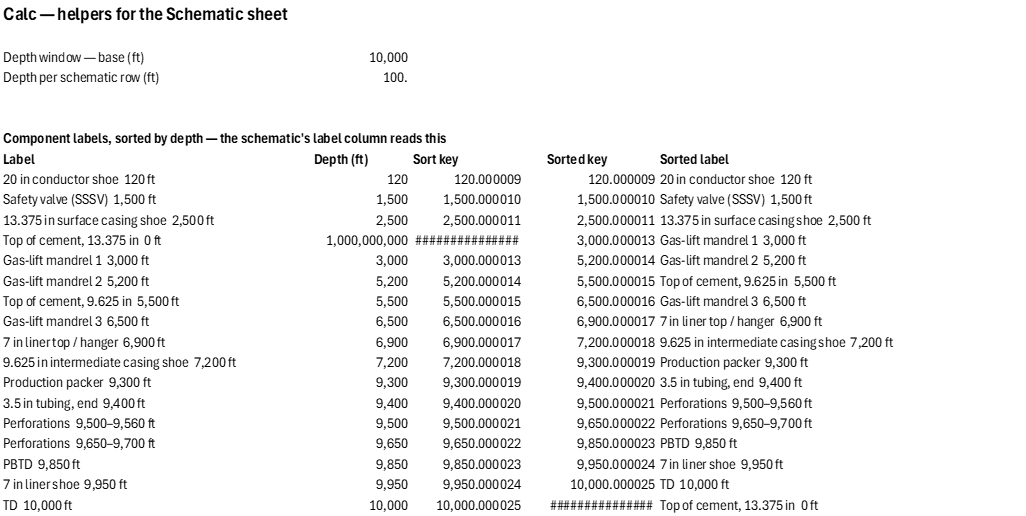
| 1 | Calc — helpers for the Schematic sheet | |||||
| 2 | ||||||
| 3 | Depth window — base (ft) | 10,000 | ||||
| 4 | Depth per schematic row (ft) | 100 | ||||
| 5 | ||||||
| 6 | ||||||
| 7 | Component labels, sorted by depth — the schematic's label column reads this | |||||
| 8 | Label | Depth (ft) | Sort key | Sorted key | Sorted label | |
| 9 | 20 in conductor shoe 120 ft | 120 | 120.000009 | 120.000009 | 20 in conductor shoe 120 ft | |
| 10 | Safety valve (SSSV) 1,500 ft | 1,500 | 1,500.000010 | 1,500.000010 | Safety valve (SSSV) 1,500 ft | |
| 11 | 13.375 in surface casing shoe 2,500 ft | 2,500 | 2,500.000011 | 2,500.000011 | 13.375 in surface casing shoe 2,500 ft | |
| 12 | Top of cement, 13.375 in 0 ft | 1,000,000,000 | 1,000,000,000.000010 | 3,000.000013 | Gas-lift mandrel 1 3,000 ft | |
| 13 | Gas-lift mandrel 1 3,000 ft | 3,000 | 3,000.000013 | 5,200.000014 | Gas-lift mandrel 2 5,200 ft | |
| 14 | Gas-lift mandrel 2 5,200 ft | 5,200 | 5,200.000014 | 5,500.000015 | Top of cement, 9.625 in 5,500 ft | |
| 15 | Top of cement, 9.625 in 5,500 ft | 5,500 | 5,500.000015 | 6,500.000016 | Gas-lift mandrel 3 6,500 ft | |
| 16 | Gas-lift mandrel 3 6,500 ft | 6,500 | 6,500.000016 | 6,900.000017 | 7 in liner top / hanger 6,900 ft | |
| 17 | 7 in liner top / hanger 6,900 ft | 6,900 | 6,900.000017 | 7,200.000018 | 9.625 in intermediate casing shoe 7,200 ft | |
| 18 | 9.625 in intermediate casing shoe 7,200 ft | 7,200 | 7,200.000018 | 9,300.000019 | Production packer 9,300 ft | |
| 19 | Production packer 9,300 ft | 9,300 | 9,300.000019 | 9,400.000020 | 3.5 in tubing, end 9,400 ft | |
| 20 | 3.5 in tubing, end 9,400 ft | 9,400 | 9,400.000020 | 9,500.000021 | Perforations 9,500–9,560 ft | |
| 21 | Perforations 9,500–9,560 ft | 9,500 | 9,500.000021 | 9,650.000022 | Perforations 9,650–9,700 ft | |
| 22 | Perforations 9,650–9,700 ft | 9,650 | 9,650.000022 | 9,850.000023 | PBTD 9,850 ft | |
| 23 | PBTD 9,850 ft | 9,850 | 9,850.000023 | 9,950.000024 | 7 in liner shoe 9,950 ft | |
| 24 | 7 in liner shoe 9,950 ft | 9,950 | 9,950.000024 | 10,000.000025 | TD 10,000 ft | |
| 25 | TD 10,000 ft | 10,000 | 10,000.000025 | 1,000,000,000.000010 | Top of cement, 13.375 in 0 ft |
| Name | Refers To | Comment |
|---|---|---|
| CS_Base | Calc!$B$3 | |
| CS_CondOD | Inputs!$B$11 | |
| CS_CondShoe | Inputs!$D$11 | |
| CS_CondTop | Inputs!$C$11 | |
| CS_EOT | Inputs!$B$18 | |
| CS_GLM1 | Inputs!$B$20 | |
| CS_GLM2 | Inputs!$B$21 | |
| CS_GLM3 | Inputs!$B$22 | |
| CS_IntOD | Inputs!$B$13 | |
| CS_IntShoe | Inputs!$D$13 | |
| CS_IntTOC | Inputs!$E$13 | |
| CS_IntTop | Inputs!$C$13 | |
| CS_LinerOD | Inputs!$B$14 | |
| CS_LinerShoe | Inputs!$D$14 | |
| CS_LinerTOC | Inputs!$E$14 | |
| CS_LinerTop | Inputs!$C$14 | |
| CS_PBTD | Inputs!$B$28 | |
| CS_Packer | Inputs!$B$23 | |
| CS_Perf1Base | Inputs!$B$25 | |
| CS_Perf1Top | Inputs!$B$24 | |
| CS_Perf2Base | Inputs!$B$27 | |
| CS_Perf2Top | Inputs!$B$26 | |
| CS_Problems | Inputs!$B$32 | |
| CS_SSSV | Inputs!$B$19 | |
| CS_SortedKey | Calc!$E$9:$E$25 | |
| CS_SortedLabel | Calc!$F$9:$F$25 | |
| CS_Step | Calc!$B$4 | |
| CS_SurfOD | Inputs!$B$12 | |
| CS_SurfShoe | Inputs!$D$12 | |
| CS_SurfTOC | Inputs!$E$12 | |
| CS_SurfTop | Inputs!$C$12 | |
| CS_TD | Inputs!$B$29 | |
| CS_TubingOD | Inputs!$B$17 | |
| CS_WellName | Inputs!$B$5 | |
| CS_WinBase | Inputs!$B$7 | |
| CS_WinTop | Inputs!$B$6 |
| Opens in | Works in any Excel: formulas and named LAMBDAs only, no add-in needed. |
| File | WellboreSchematic.xlsx, 21 KB |
| Category | Drilling |
| For agents and tools | Structure (.json) · Descriptor (.md) |