Function Browser
Browse, search, and explore
Find the Right Function Instantly
The Function Browser organizes every Petroleum Office function into a searchable, categorized library — available both in Excel and on the web.
Organized by Category
Hierarchical category tree
- PVT, DCA, VFP, IPR, MBE, and more
- Nested subcategories for easy navigation
- Collapse and expand category groups
Full-Text Search
Find functions by name or keyword
- Type any keyword to filter instantly
- Search across names, descriptions, and categories
- Jump to any function in one click
Rich Documentation
Every function fully documented
- Syntax and parameter descriptions
- Usage examples with expected values
- Related functions and blueprints
In Excel: Ribbon Access
Open the Function Browser from the Petroleum Office ribbon to search and insert functions without leaving your spreadsheet.
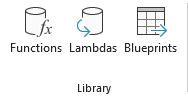
Screenshot: Ribbon → Library → Functions button
Click Functions in the Library group to open the browser
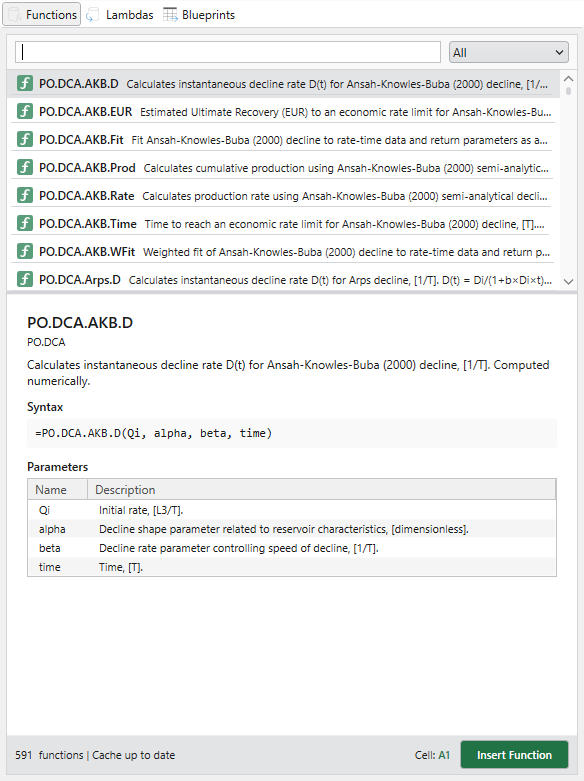
Screenshot: Function Browser window with search and category tree
Search, browse categories, and view full documentation
Online: Browse Anytime
The same function library is available on the web — search, read documentation, and discover related blueprints from any device.
Function Catalog
Browse all functions online
- Organized by category with sidebar navigation
- Search across names, descriptions, and categories
- View function count per category
Function Details
Full documentation per function
- Syntax and parameter descriptions
- Usage examples with expected values
- Related functions and blueprints